

AI Agent Component Spec
AI Agent Component Spec
Report incorrect code
Copy
Ask AI
{
  "package": "@cometchat/chat-uikit-react",
  "keyClass": "ShortcutFormatter",
  "extends": "CometChatTextFormatter",
  "trackCharacter": "!",
  "purpose": "Expand shortcodes like !hb into full text via Message Shortcuts extension"
}
Overview
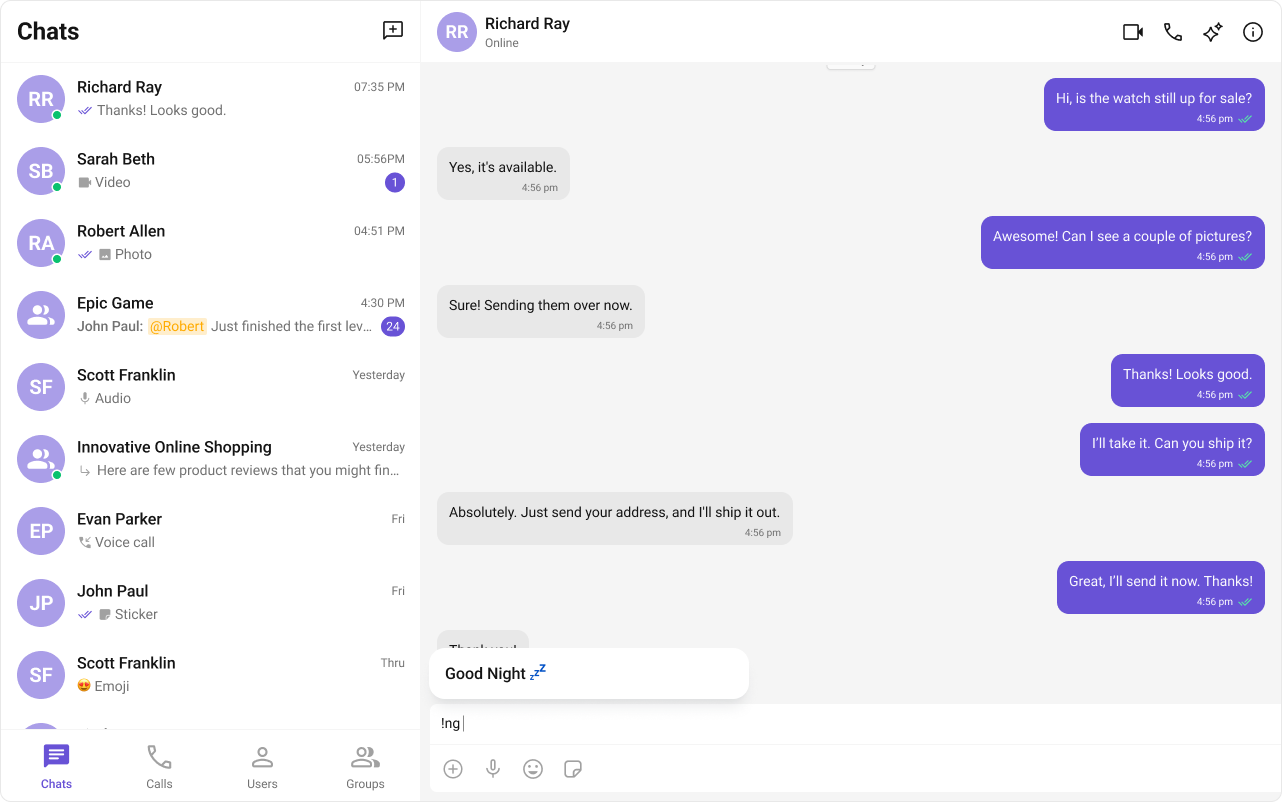
Create a shortcut formatter that expands shortcodes (like!hb) into full text. When a user types a shortcut, a dialog appears with the expansion — clicking it inserts the text.
Time estimate: 15 minutesDifficulty: Advanced
Prerequisites
- React.js integration completed
- Custom Formatters guide reviewed
- Message Shortcuts extension enabled in CometChat Dashboard
Steps
Step 1: Create the formatter class
ExtendCometChatTextFormatter and set the tracking character:
Report incorrect code
Copy
Ask AI
import { CometChatTextFormatter } from "@cometchat/chat-uikit-react";
import { CometChat } from "@cometchat/chat-sdk-javascript";

class ShortcutFormatter extends CometChatTextFormatter {
  private shortcuts: { [key: string]: string } = {};
  private dialogIsOpen: boolean = false;
  private currentShortcut: string | null = null;

  constructor() {
    super();
    this.setTrackingCharacter("!");
    this.loadShortcuts();
  }

  private async loadShortcuts() {
    try {
      const data: any = await CometChat.callExtension(
        "message-shortcuts",
        "GET",
        "v1/fetch",
        undefined
      );
      if (data?.shortcuts) {
        this.shortcuts = data.shortcuts;
      }
    } catch (error) {
      console.error("Error fetching shortcuts:", error);
    }
  }

  getFormattedText(text: string): string {
    return text;
  }
}

export default ShortcutFormatter;
Step 2: Handle key events
Detect shortcuts as the user types:Report incorrect code
Copy
Ask AI
class ShortcutFormatter extends CometChatTextFormatter {
  // ... previous code

  onKeyUp(event: KeyboardEvent) {
    const caretPosition =
      this.currentCaretPosition instanceof Selection
        ? this.currentCaretPosition.anchorOffset
        : 0;
    const textBeforeCaret = this.getTextBeforeCaret(caretPosition);

    const match = textBeforeCaret.match(/!([a-zA-Z]+)$/);
    if (match) {
      const shortcut = match[0];
      const replacement = this.shortcuts[shortcut];
      if (replacement) {
        if (this.dialogIsOpen && this.currentShortcut !== shortcut) {
          this.closeDialog();
        }
        this.openDialog(replacement, shortcut);
      }
    } else if (!textBeforeCaret) {
      this.closeDialog();
    }
  }

  private getTextBeforeCaret(caretPosition: number): string {
    if (
      this.currentRange &&
      this.currentRange.startContainer &&
      typeof this.currentRange.startContainer.textContent === "string"
    ) {
      const textContent = this.currentRange.startContainer.textContent;
      if (textContent.length >= caretPosition) {
        return textContent.substring(0, caretPosition);
      }
    }
    return "";
  }
}
Step 3: Create the dialog helper
Show expansion suggestions usingCometChatUIEvents:
Report incorrect code
Copy
Ask AI
import React from "react";
import { CometChatUIEvents, PanelAlignment } from "@cometchat/chat-uikit-react";

interface DialogProps {
  onClick: () => void;
  buttonText: string;
}

const ShortcutDialog: React.FC<DialogProps> = ({ onClick, buttonText }) => {
  return (
    <div style={{ width: "100%", height: 45 }}>
      <button
        style={{
          width: "100%",
          height: "100%",
          cursor: "pointer",
          backgroundColor: "#f2e6ff",
          border: "2px solid #9b42f5",
          borderRadius: 12,
          textAlign: "left",
          paddingLeft: 20,
          font: "600 15px sans-serif",
        }}
        onClick={onClick}
      >
        {buttonText}
      </button>
    </div>
  );
};

export class DialogHelper {
  private dialogContainer: HTMLDivElement | null = null;

  createDialog(onClick: () => void, buttonText: string) {
    this.dialogContainer = document.createElement("div");
    document.body.appendChild(this.dialogContainer);

    CometChatUIEvents.ccShowPanel.next({
      child: <ShortcutDialog onClick={onClick} buttonText={buttonText} />,
      position: PanelAlignment.messageListFooter,
    });
  }

  closeDialog() {
    if (this.dialogContainer) {
      CometChatUIEvents.ccHidePanel.next(PanelAlignment.messageListFooter);
      this.dialogContainer.remove();
      this.dialogContainer = null;
    }
  }
}
Step 4: Complete the formatter
Add dialog management and text insertion:Report incorrect code
Copy
Ask AI
import { CometChatTextFormatter } from "@cometchat/chat-uikit-react";
import { CometChat } from "@cometchat/chat-sdk-javascript";
import { DialogHelper } from "./DialogHelper";

class ShortcutFormatter extends CometChatTextFormatter {
  private shortcuts: { [key: string]: string } = {};
  private dialogIsOpen: boolean = false;
  private dialogHelper = new DialogHelper();
  private currentShortcut: string | null = null;

  constructor() {
    super();
    this.setTrackingCharacter("!");
    this.loadShortcuts();
  }

  private async loadShortcuts() {
    try {
      const data: any = await CometChat.callExtension(
        "message-shortcuts",
        "GET",
        "v1/fetch",
        undefined
      );
      if (data?.shortcuts) {
        this.shortcuts = data.shortcuts;
      }
    } catch (error) {
      console.error("Error fetching shortcuts:", error);
    }
  }

  onKeyUp(event: KeyboardEvent) {
    const caretPosition =
      this.currentCaretPosition instanceof Selection
        ? this.currentCaretPosition.anchorOffset
        : 0;
    const textBeforeCaret = this.getTextBeforeCaret(caretPosition);

    const match = textBeforeCaret.match(/!([a-zA-Z]+)$/);
    if (match) {
      const shortcut = match[0];
      const replacement = this.shortcuts[shortcut];
      if (replacement) {
        if (this.dialogIsOpen && this.currentShortcut !== shortcut) {
          this.closeDialog();
        }
        this.openDialog(replacement, shortcut);
      }
    } else if (!textBeforeCaret) {
      this.closeDialog();
    }
  }

  openDialog(buttonText: string, shortcut: string) {
    this.dialogHelper.createDialog(
      () => this.handleButtonClick(buttonText),
      buttonText
    );
    this.dialogIsOpen = true;
    this.currentShortcut = shortcut;
  }

  closeDialog() {
    this.dialogHelper.closeDialog();
    this.dialogIsOpen = false;
    this.currentShortcut = null;
  }

  handleButtonClick = (buttonText: string) => {
    if (this.currentCaretPosition && this.currentRange) {
      const shortcut = Object.keys(this.shortcuts).find(
        (key) => this.shortcuts[key] === buttonText
      );
      if (shortcut) {
        const replacement = this.shortcuts[shortcut];
        this.addAtCaretPosition(
          replacement,
          this.currentCaretPosition,
          this.currentRange
        );
      }
    }
    if (this.dialogIsOpen) {
      this.closeDialog();
    }
  };

  getFormattedText(text: string): string {
    return text;
  }

  private getTextBeforeCaret(caretPosition: number): string {
    if (
      this.currentRange &&
      this.currentRange.startContainer &&
      typeof this.currentRange.startContainer.textContent === "string"
    ) {
      const textContent = this.currentRange.startContainer.textContent;
      if (textContent.length >= caretPosition) {
        return textContent.substring(0, caretPosition);
      }
    }
    return "";
  }
}

export default ShortcutFormatter;
Step 5: Use the formatter
Pass it to the message composer:Report incorrect code
Copy
Ask AI
import { CometChatMessageComposer } from "@cometchat/chat-uikit-react";
import ShortcutFormatter from "./ShortcutFormatter";

function ChatWithShortcuts({ user }) {
  return (
    <CometChatMessageComposer
      user={user}
      textFormatters={[new ShortcutFormatter()]}
    />
  );
}
Complete Example
Report incorrect code
Copy
Ask AI
import { useEffect, useState } from "react";
import {
  CometChatMessageList,
  CometChatMessageComposer,
  CometChatMessageHeader,
} from "@cometchat/chat-uikit-react";
import { CometChat } from "@cometchat/chat-sdk-javascript";
import ShortcutFormatter from "./ShortcutFormatter";
import "@cometchat/chat-uikit-react/css-variables.css";

function ShortcutsChat() {
  const [user, setUser] = useState<CometChat.User>();
  const shortcutFormatter = new ShortcutFormatter();

  useEffect(() => {
    CometChat.getUser("USER_UID").then(setUser);
  }, []);

  if (!user) return <div>Loading...</div>;

  return (
    <div style={{ height: "100vh", display: "flex", flexDirection: "column" }}>
      <CometChatMessageHeader user={user} />
      <div style={{ flex: 1, overflow: "hidden" }}>
        <CometChatMessageList user={user} />
      </div>
      <CometChatMessageComposer
        user={user}
        textFormatters={[shortcutFormatter]}
      />
    </div>
  );
}

export default ShortcutsChat;
Common Issues
The Message Shortcuts extension must be enabled in the CometChat Dashboard for shortcuts to load.
| Issue | Solution |
|---|---|
| No shortcuts loading | Enable Message Shortcuts extension in Dashboard |
| Dialog not appearing | Check CometChatUIEvents is imported correctly |
| Text not inserting | Verify addAtCaretPosition is called with valid range |