{
  "component": "CometChatAIAssistantChat",
  "package": "@cometchat/chat-uikit-react",
  "import": "import { CometChatAIAssistantChat } from \"@cometchat/chat-uikit-react\";",
  "description": "Composite AI agent chat with streaming responses, quick suggestions, new-chat reset, and chat history sidebar.",
  "cssRootClass": ".cometchat-ai-assistant-chat",
  "requiredProps": {
    "user": "CometChat.User — the AI agent user object"
  },
  "optionalProps": {
    "streamingSpeed": "number",
    "suggestedMessages": "string[]",
    "hideSuggestedMessages": "boolean",
    "hideNewChat": "boolean",
    "hideChatHistory": "boolean",
    "showBackButton": "boolean",
    "showCloseButton": "boolean",
    "loadLastAgentConversation": "boolean",
    "aiAssistantTools": "CometChatAIAssistantTools"
  },
  "callbacks": {
    "onBackButtonClicked": "() => void",
    "onCloseButtonClicked": "() => void",
    "onSendButtonClick": "(message: CometChat.BaseMessage) => void",
    "onError": "(e: CometChat.CometChatException) => void"
  }
}

Overview

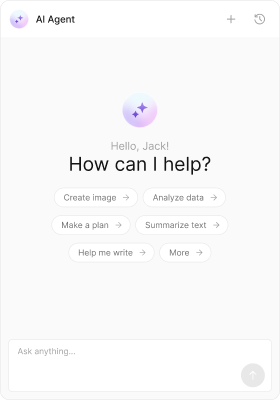
The AI Assistant Chat component provides a complete AI conversation interface. It includes streaming responses, suggested prompts, chat history, and the ability to start new conversations. Pass a CometChat.User representing your AI agent to get started. Time estimate: 15 minutes
Difficulty: Intermediate

Prerequisites

Steps

Step 1: Fetch the AI agent and render the chat

Get your AI agent user and display the chat interface:
import { useState, useEffect } from "react";
import { CometChat } from "@cometchat/chat-sdk-javascript";
import { CometChatAIAssistantChat } from "@cometchat/chat-uikit-react";

function AIAssistantPanel() {
  const [agent, setAgent] = useState<CometChat.User>();

  useEffect(() => {
    CometChat.getUser("assistant_uid").then((u) => setAgent(u));
  }, []);

  if (!agent) return null;

  return (
    <div style={{ height: "100vh", width: 480 }}>
      <CometChatAIAssistantChat user={agent} />
    </div>
  );
}
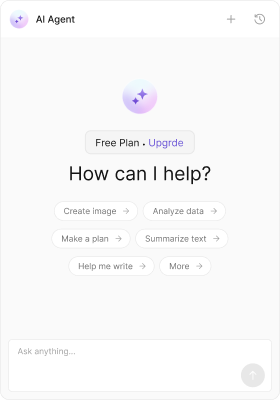
AI Assistant Chat interface

Step 2: Add suggested prompts

Provide quick-start suggestions for users:
<CometChatAIAssistantChat
  user={agent}
  suggestedMessages={[
    "What can you help me with?",
    "Summarize my recent messages",
    "Draft a professional email",
    "Explain this code snippet",
  ]}
/>

Step 3: Enable chat history

Let users continue previous conversations:
<CometChatAIAssistantChat
  user={agent}
  loadLastAgentConversation={true}
  // Or load a specific conversation:
  // parentMessageId={12345}
/>

Step 4: Add navigation controls

Show back and close buttons for panel navigation:
function AIPanel({ onClose }: { onClose: () => void }) {
  const [agent, setAgent] = useState<CometChat.User>();

  useEffect(() => {
    CometChat.getUser("assistant_uid").then((u) => setAgent(u));
  }, []);

  if (!agent) return null;

  return (
    <CometChatAIAssistantChat
      user={agent}
      showBackButton={true}
      showCloseButton={true}
      onBackButtonClicked={() => window.history.back()}
      onCloseButtonClicked={onClose}
    />
  );
}

Step 5: Create a minimal assistant

Remove chrome for an embedded experience:
<CometChatAIAssistantChat
  user={agent}
  hideNewChat={true}
  hideChatHistory={true}
  hideSuggestedMessages={true}
/>

Step 6: Add tool/function calling

Enable the AI to execute functions during conversations:
import {
  CometChatAIAssistantChat,
  CometChatAIAssistantTools,
} from "@cometchat/chat-uikit-react";

function AIWithTools({ agent }: { agent: CometChat.User }) {
  const tools = new CometChatAIAssistantTools({
    getCurrentWeather: ({ location }: { location: string }) => {
      console.log("Fetching weather for:", location);
      return { temp: 72, condition: "Sunny" };
    },
    createTicket: ({ title, priority }: { title: string; priority: string }) => {
      console.log("Creating ticket:", title, priority);
      return { ticketId: "TKT-123" };
    },
    searchDocuments: ({ query }: { query: string }) => {
      console.log("Searching:", query);
      return [{ title: "Result 1" }, { title: "Result 2" }];
    },
  });

  return <CometChatAIAssistantChat user={agent} aiAssistantTools={tools} />;
}

Step 7: Customize the empty state

Personalize the greeting and intro message:
<CometChatAIAssistantChat
  user={agent}
  emptyChatImageView={
    <img src="/images/ai-bot.png" height={80} width={80} alt="AI Assistant" />
  }
  emptyChatGreetingView={
    <div className="ai-greeting">
      <span className="plan-badge">Pro Plan</span>
      <span className="upgrade-link">Upgrade</span>
    </div>
  }
  emptyChatIntroMessageView={
    <div className="ai-intro">
      Hi! I'm your AI assistant. How can I help you today?
    </div>
  }
/>
Custom greeting view

Complete Example

import { useState, useEffect } from "react";
import { CometChat } from "@cometchat/chat-sdk-javascript";
import {
  CometChatAIAssistantChat,
  CometChatAIAssistantTools,
} from "@cometchat/chat-uikit-react";
import "@cometchat/chat-uikit-react/css-variables.css";

function AIAssistantApp() {
  const [agent, setAgent] = useState<CometChat.User>();
  const [isOpen, setIsOpen] = useState(true);

  useEffect(() => {
    CometChat.getUser("YOUR_AI_AGENT_UID").then((u) => setAgent(u));
  }, []);

  // Define tools the AI can use
  const tools = new CometChatAIAssistantTools({
    searchKnowledgeBase: ({ query }: { query: string }) => {
      console.log("Searching knowledge base:", query);
      return { results: ["Article 1", "Article 2"] };
    },
  });

  if (!agent || !isOpen) return null;

  return (
    <div style={{ height: "100vh", width: 480, position: "fixed", right: 0 }}>
      <CometChatAIAssistantChat
        user={agent}
        suggestedMessages={[
          "What can you help with?",
          "Search the knowledge base",
          "Summarize my tasks",
        ]}
        loadLastAgentConversation={true}
        showCloseButton={true}
        onCloseButtonClicked={() => setIsOpen(false)}
        aiAssistantTools={tools}
        onSendButtonClick={(message) => {
          console.log("User sent:", message);
        }}
        onError={(error) => {
          console.error("AI chat error:", error);
        }}
      />
    </div>
  );
}

export default AIAssistantApp;
Customize how messages render in the AI chat:
import { ChatConfigurator } from "@cometchat/chat-uikit-react";

const getCustomTemplates = () => {
  const templates = ChatConfigurator.getDataSource().getAllMessageTemplates();
  
  // Remove footer from all messages
  templates.forEach((template) => {
    template.footerView = () => null;
  });
  
  return templates;
};

<CometChatAIAssistantChat
  user={agent}
  templates={getCustomTemplates()}
/>

Common Issues

The user prop must be a valid CometChat.User object representing an AI agent. Fetch it using CometChat.getUser() before rendering the component.
IssueSolution
Chat not loadingVerify AI agent UID exists in CometChat dashboard
Streaming not workingCheck AI features are enabled for your app
Tools not executingEnsure tool names match your AI agent configuration

Next Steps