Field Value Package @cometchat/chat-uikit-reactSmart Features Conversation Starter, Smart Replies, Conversation Summary AI Assistant CometChatAIAssistantChat — standalone AI chat panelActivation Enable AI features from CometChat Dashboard Auto-integration Smart features auto-integrate into MessageList and MessageComposer
Overview This guide shows you how to add AI-powered features to your React chat app. You’ll learn to enable smart chat features (conversation starters, smart replies, summaries) and integrate a full AI assistant chat panel.
Time estimate: 15 minutes
Difficulty: IntermediatePrerequisites Use Cases AI features enhance chat experiences for:
Customer support — AI-suggested replies speed up agent responsesOnboarding — Conversation starters help new users engageLong conversations — Summaries help users catch up on missed messagesAI assistants — Dedicated AI chat for help, FAQs, or automation
Smart Chat Features Smart chat features auto-integrate into existing UI Kit components when enabled in the Dashboard. No additional code required.
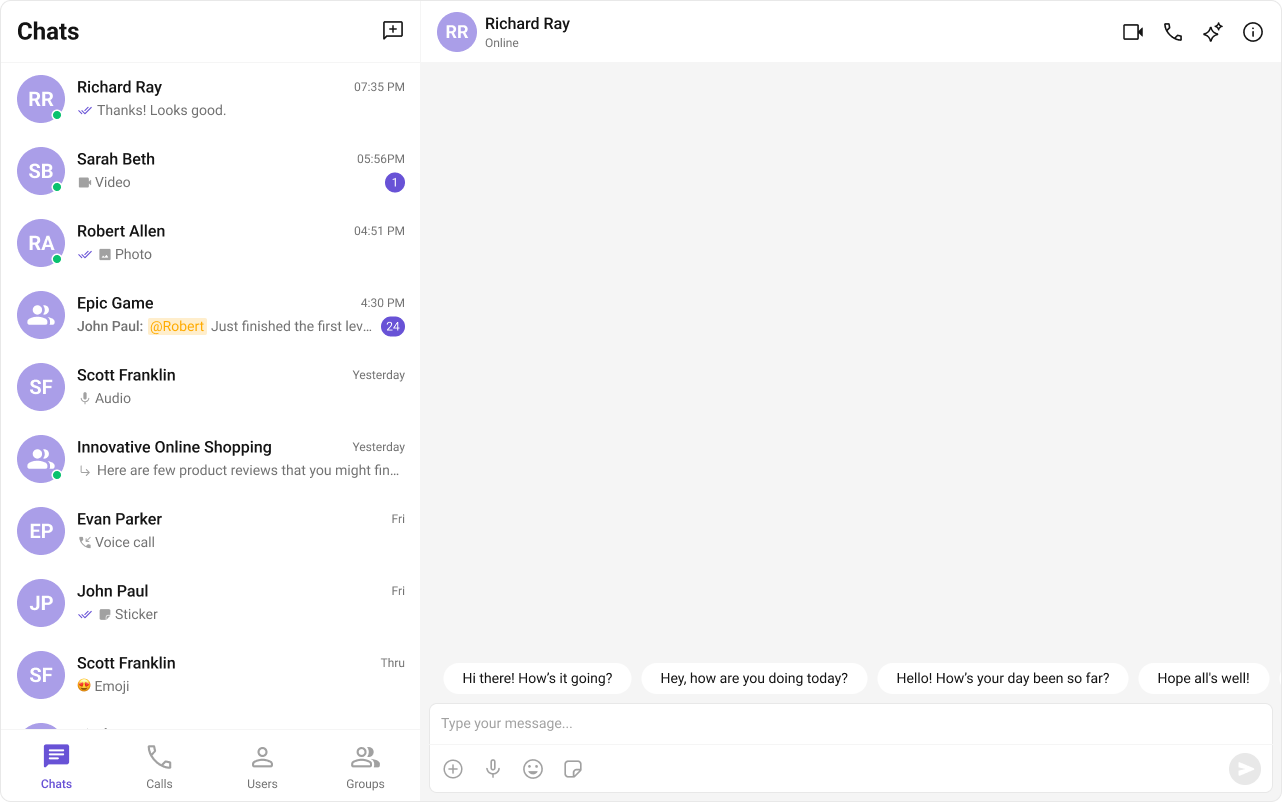
Conversation Starter AI-generated opening lines displayed when a user starts a new chat.
Feature Details Auto-integrates into CometChatMessageListActivation Enable in Dashboard → AI Features → Conversation Starter Documentation Conversation Starter
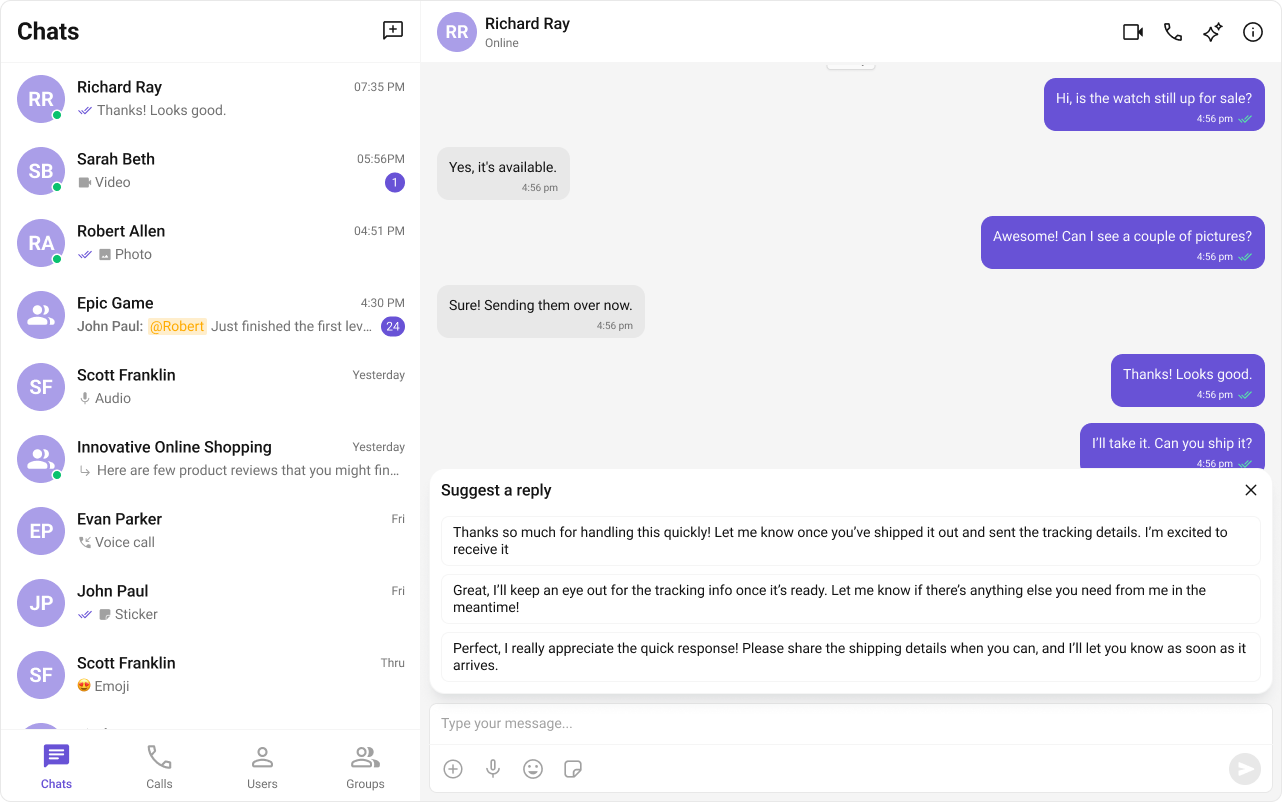
Smart Replies AI-generated response suggestions based on conversation context.
Feature Details Auto-integrates into CometChatMessageComposer action sheetActivation Enable in Dashboard → AI Features → Smart Replies Documentation Smart Replies
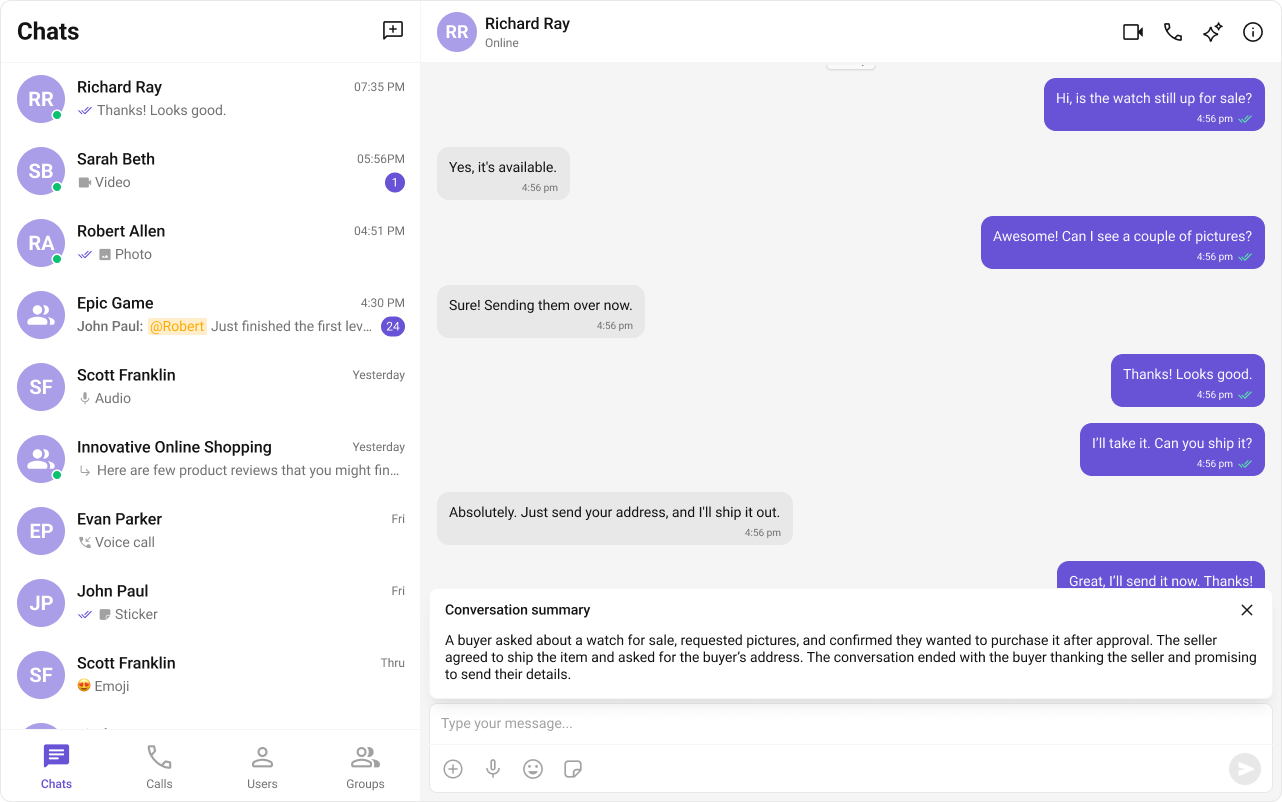
Conversation Summary AI-generated recap of long conversations.
Feature Details Auto-integrates into CometChatMessageComposer action sheetActivation Enable in Dashboard → AI Features → Conversation Summary Documentation Conversation Summary
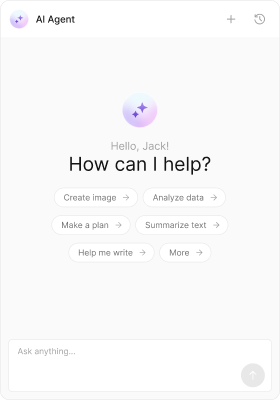
AI Assistant Chat For a dedicated AI chat experience, use the CometChatAIAssistantChat component. This provides a full-featured AI conversation panel with streaming responses, suggestions, and chat history.
Step 1: Create an AI Agent User First, create an AI agent user in your CometChat app. This can be done via the Dashboard or SDK:
import { CometChat } from "@cometchat/chat-sdk-javascript" ; // Create AI agent user (typically done once during setup) async function createAIAgent () { const agent = new CometChat . User ( "ai_assistant" ); agent . setName ( "AI Assistant" ); agent . setMetadata ({ greetingMessage: "Hello! How can I help you today?" , introductoryMessage: "I can answer questions, help with tasks, and more." , }); await CometChat . createUser ( agent , "YOUR_AUTH_KEY" ); }
Step 2: Add the AI Assistant Component import { useState , useEffect } from "react" ; import { CometChat } from "@cometchat/chat-sdk-javascript" ; import { CometChatAIAssistantChat } from "@cometchat/chat-uikit-react" ; import "@cometchat/chat-uikit-react/css-variables.css" ; function AIAssistantDemo () { const [ agent , setAgent ] = useState < CometChat . User >(); useEffect (() => { CometChat . getUser ( "ai_assistant" ). then ( setAgent ); }, []); if ( ! agent ) return null ; return ( < div style = { { height: "100vh" , width: 480 } } > < CometChatAIAssistantChat user = { agent } /> </ div > ); } export default AIAssistantDemo ;
Step 3: Add Quick Suggestions Provide suggested prompts to help users get started:
AIAssistantWithSuggestions.tsx
import { useState , useEffect } from "react" ; import { CometChat } from "@cometchat/chat-sdk-javascript" ; import { CometChatAIAssistantChat } from "@cometchat/chat-uikit-react" ; import "@cometchat/chat-uikit-react/css-variables.css" ; function AIAssistantWithSuggestions () { const [ agent , setAgent ] = useState < CometChat . User >(); useEffect (() => { CometChat . getUser ( "ai_assistant" ). then ( setAgent ); }, []); if ( ! agent ) return null ; return ( < CometChatAIAssistantChat user = { agent } suggestedMessages = { [ "What can you help with?" , "Summarize my recent messages" , "Help me draft a message" , ] } /> ); } export default AIAssistantWithSuggestions ;
Step 4: Enable Chat History Allow users to access previous AI conversations:
AIAssistantWithHistory.tsx
import { useState , useEffect } from "react" ; import { CometChat } from "@cometchat/chat-sdk-javascript" ; import { CometChatAIAssistantChat } from "@cometchat/chat-uikit-react" ; import "@cometchat/chat-uikit-react/css-variables.css" ; function AIAssistantWithHistory () { const [ agent , setAgent ] = useState < CometChat . User >(); useEffect (() => { CometChat . getUser ( "ai_assistant" ). then ( setAgent ); }, []); if ( ! agent ) return null ; return ( < CometChatAIAssistantChat user = { agent } loadLastAgentConversation = { true } suggestedMessages = { [ "What can you help with?" , "Summarize my tasks" ] } /> ); } export default AIAssistantWithHistory ;
Enable the AI to perform actions using tools:
import { useState , useEffect } from "react" ; import { CometChat } from "@cometchat/chat-sdk-javascript" ; import { CometChatAIAssistantChat , CometChatAIAssistantTools , } from "@cometchat/chat-uikit-react" ; import "@cometchat/chat-uikit-react/css-variables.css" ; function AIAssistantWithTools () { const [ agent , setAgent ] = useState < CometChat . User >(); useEffect (() => { CometChat . getUser ( "ai_assistant" ). then ( setAgent ); }, []); const tools = new CometChatAIAssistantTools ({ getCurrentWeather : ({ location } : { location : string }) => { console . log ( "Fetching weather for" , location ); return { temperature: 72 , condition: "Sunny" }; }, createTicket : ({ title , description } : { title : string ; description : string }) => { console . log ( "Creating ticket:" , title ); return { ticketId: "TICKET-123" , status: "created" }; }, }); if ( ! agent ) return null ; return ( < CometChatAIAssistantChat user = { agent } aiAssistantTools = { tools } suggestedMessages = { [ "What's the weather?" , "Create a support ticket" ] } /> ); } export default AIAssistantWithTools ;
Complete Example Here’s a full implementation with AI assistant integrated into a chat app:
import { useState , useEffect } from "react" ; import { CometChatConversations , CometChatMessageHeader , CometChatMessageList , CometChatMessageComposer , CometChatAIAssistantChat , } from "@cometchat/chat-uikit-react" ; import { CometChat } from "@cometchat/chat-sdk-javascript" ; import "@cometchat/chat-uikit-react/css-variables.css" ; function ChatAppWithAI () { const [ selectedConversation , setSelectedConversation ] = useState < CometChat . Conversation >(); const [ showAIAssistant , setShowAIAssistant ] = useState ( false ); const [ aiAgent , setAIAgent ] = useState < CometChat . User >(); useEffect (() => { CometChat . getUser ( "ai_assistant" ). then ( setAIAgent ); }, []); const getConversationWith = () => { if ( ! selectedConversation ) return null ; const type = selectedConversation . getConversationType (); if ( type === "user" ) { return { user: selectedConversation . getConversationWith () as CometChat . User }; } return { group: selectedConversation . getConversationWith () as CometChat . Group }; }; const conversationWith = getConversationWith (); return ( < div style = { { display: "flex" , height: "100vh" , width: "100vw" } } > { /* Conversations Panel */ } < div style = { { width: 400 , height: "100%" , borderRight: "1px solid #eee" } } > < CometChatConversations onItemClick = { ( conversation ) => { setSelectedConversation ( conversation ); setShowAIAssistant ( false ); } } /> { /* AI Assistant Button */ } < button onClick = { () => setShowAIAssistant ( true ) } style = { { width: "100%" , padding: "12px" , background: "#6852d6" , color: "white" , border: "none" , cursor: "pointer" , } } > 🤖 AI Assistant </ button > </ div > { /* Main Panel */ } < div style = { { flex: 1 , display: "flex" , flexDirection: "column" } } > { showAIAssistant && aiAgent ? ( < CometChatAIAssistantChat user = { aiAgent } showBackButton = { true } onBackButtonClicked = { () => setShowAIAssistant ( false ) } suggestedMessages = { [ "What can you help with?" , "Summarize my conversations" , "Help me draft a message" , ] } loadLastAgentConversation = { true } /> ) : conversationWith ? ( <> < CometChatMessageHeader { ... conversationWith } /> < CometChatMessageList { ... conversationWith } /> < CometChatMessageComposer { ... conversationWith } /> </> ) : ( < div style = { { flex: 1 , display: "grid" , placeItems: "center" , background: "#f5f5f5" , color: "#727272" } } > Select a conversation or try the AI Assistant </ div > ) } </ div > </ div > ); } export default ChatAppWithAI ;
Minimal AI Assistant (No Chrome) Hide all auxiliary UI elements: < CometChatAIAssistantChat user = { agent } hideNewChat = { true } hideChatHistory = { true } hideSuggestedMessages = { true } />
Custom Empty State Customize the greeting and intro messages: < CometChatAIAssistantChat user = { agent } emptyChatGreetingView = { < div > Welcome to AI Support! </ div > } emptyChatIntroMessageView = { < div > Ask me anything about our products. </ div > } emptyChatImageView = { < img src = "/ai-avatar.png" alt = "AI" width = { 60 } /> } />
Streaming Speed Control how fast AI responses stream: < CometChatAIAssistantChat user = { agent } streamingSpeed = { 50 } // Characters per second />
Event Callbacks Handle user interactions: < CometChatAIAssistantChat user = { agent } showBackButton = { true } showCloseButton = { true } onBackButtonClicked = { () => navigate ( - 1 ) } onCloseButtonClicked = { () => setShowAI ( false ) } onSendButtonClick = { ( message ) => console . log ( "Sent:" , message ) } onError = { ( error ) => console . error ( "AI error:" , error ) } />
Key CSS Selectors Target Selector Root .cometchat-ai-assistant-chatHeader .cometchat-ai-assistant-chat__header-wrapperMessage list .cometchat-ai-assistant-chat__message-list-wrapperComposer .cometchat-ai-assistant-chat__composer-wrapperEmpty state .cometchat-ai-assistant-chat__empty-stateSuggestion pill .cometchat-ai-assistant-chat__suggested-message-pillChat history sidebar .cometchat-ai-assistant-chat__sidebar
Example: Brand-Themed AI Assistant .cometchat-ai-assistant-chat .cometchat-ai-assistant-chat__suggested-message-pill { background : #6852d6 ; color : #ffffff ; border-radius : 20 px ; } .cometchat-ai-assistant-chat .cometchat-ai-assistant-chat__header-auxiliary-view .cometchat-button__icon-default { background : #6852d6 ; } .cometchat-ai-assistant-chat .cometchat-ai-assistant-chat__empty-state { background : linear-gradient ( 180 deg , #f9f8fd 0 % , #ffffff 100 % ); }
Common Issues AI features must be enabled in the CometChat Dashboard before they appear in the UI Kit components.
Issue Solution Smart features not showing Enable them in Dashboard → AI Features AI Assistant not loading Verify the AI agent user exists and UID is correct Suggestions not appearing Check suggestedMessages prop is an array of strings Chat history empty Ensure loadLastAgentConversation={true} is set Tools not working Verify CometChatAIAssistantTools handlers return values Styles missing Add @import url("@cometchat/chat-uikit-react/css-variables.css");
For more help, see the Troubleshooting Guide or contact CometChat Support .
Next Steps