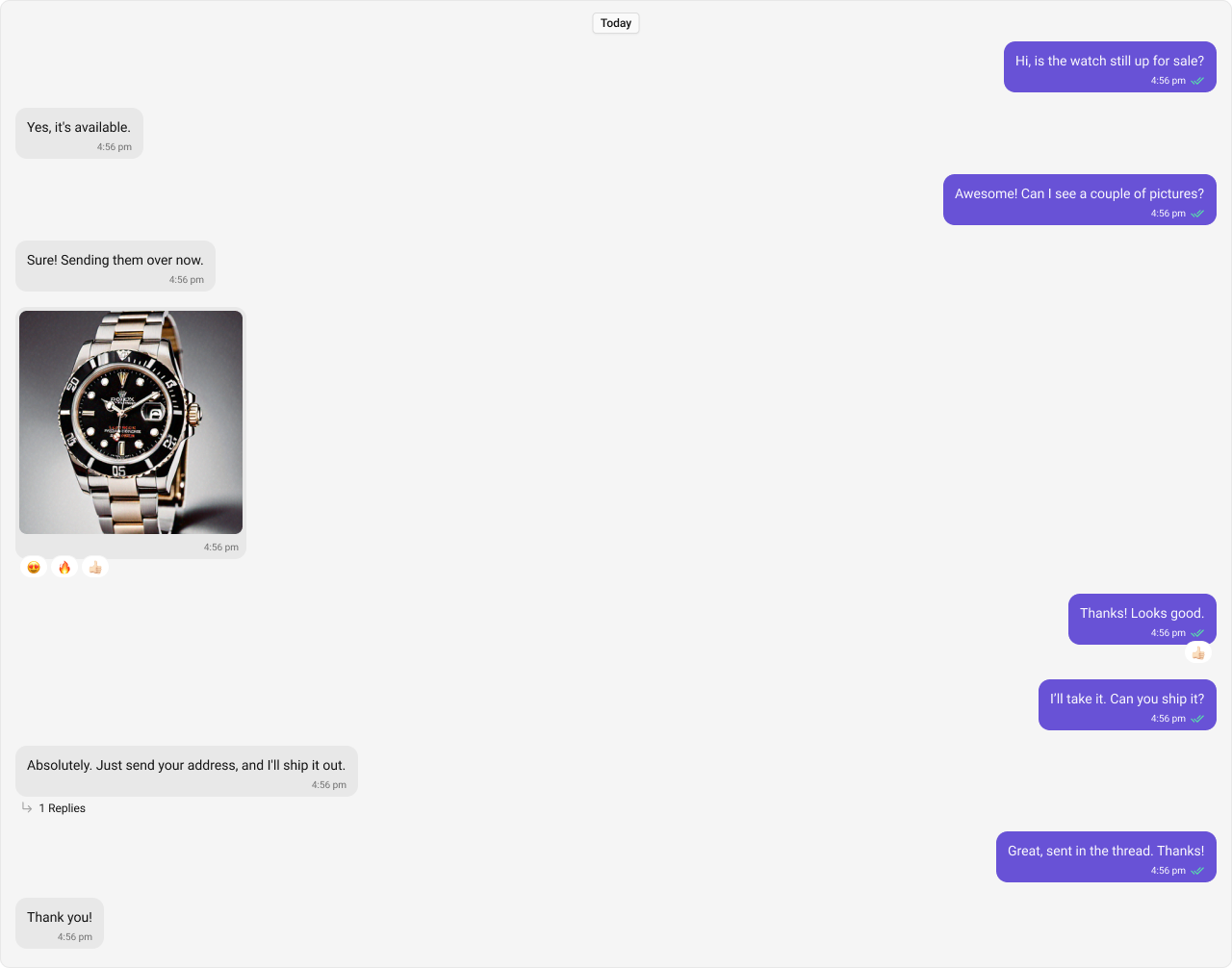
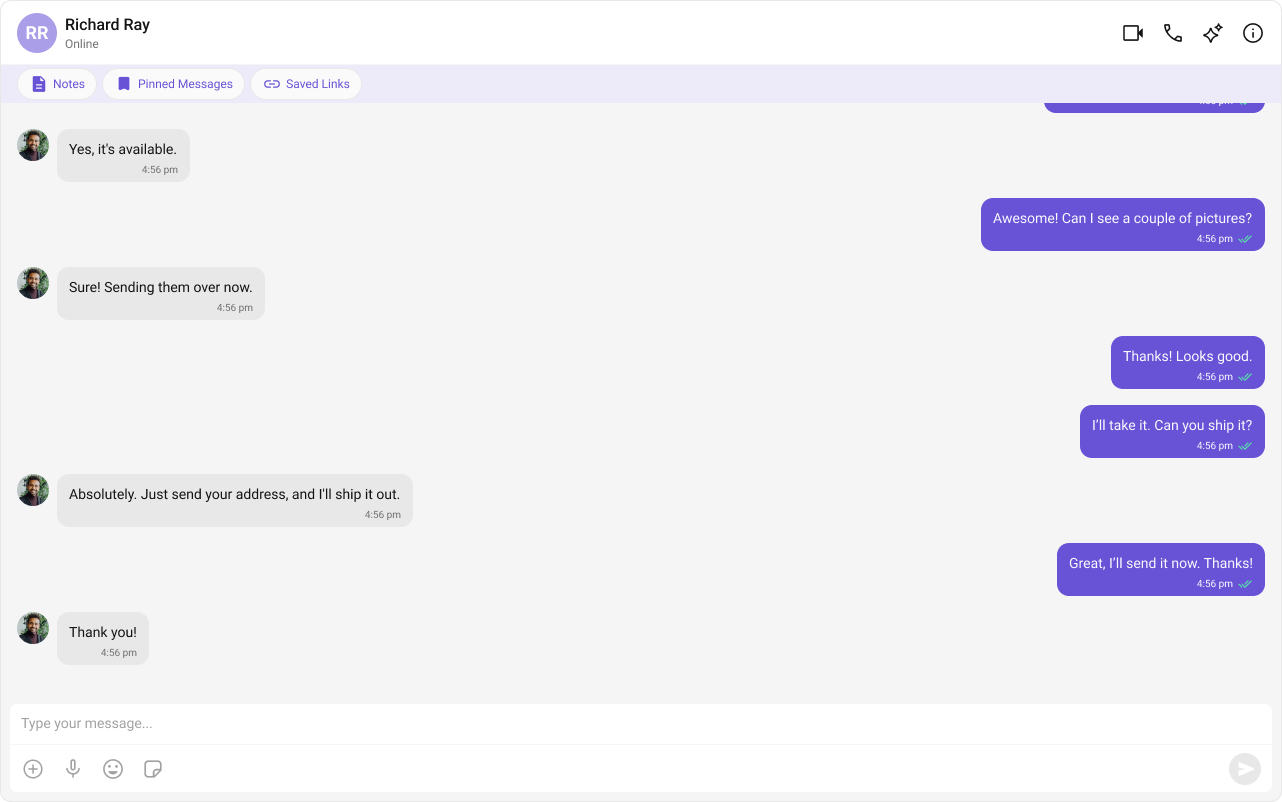
Field Value Package @cometchat/chat-uikit-reactComponent CometChatMessageList — scrollable message feedCSS Import @import url("@cometchat/chat-uikit-react/css-variables.css");Key Props user, group, templates, messagesRequestBuilderReal-time Auto-updates on new messages, edits, deletes, reactions
Overview This guide shows you how to display a scrollable list of messages with reactions, read receipts, threaded replies, and AI features. You’ll learn to customize message rendering and handle user interactions.
Time estimate: 15 minutes
Difficulty: IntermediatePrerequisites Use Cases The message list is essential for:
Chat history — Display sent and received messagesReal-time updates — Show new messages as they arriveMessage actions — Edit, delete, react, reply to messagesThreaded conversations — Support reply threadsAI features — Show smart replies and conversation starters
Steps Step 1: Add Basic Message List Display messages for a user conversation:
import { useState , useEffect } from "react" ; import { CometChat } from "@cometchat/chat-sdk-javascript" ; import { CometChatMessageList } from "@cometchat/chat-uikit-react" ; import "@cometchat/chat-uikit-react/css-variables.css" ; function BasicMessageList () { const [ user , setUser ] = useState < CometChat . User >(); useEffect (() => { CometChat . getUser ( "user_uid" ). then ( setUser ); }, []); if ( ! user ) return null ; return ( < div style = { { height: "100vh" } } > < CometChatMessageList user = { user } /> </ div > ); } export default BasicMessageList ;
Step 2: Create a Minimal Message List Hide all chrome for a clean, minimal view:
import { useState , useEffect } from "react" ; import { CometChat } from "@cometchat/chat-sdk-javascript" ; import { CometChatMessageList } from "@cometchat/chat-uikit-react" ; import "@cometchat/chat-uikit-react/css-variables.css" ; function MinimalMessageList () { const [ user , setUser ] = useState < CometChat . User >(); useEffect (() => { CometChat . getUser ( "user_uid" ). then ( setUser ); }, []); if ( ! user ) return null ; return ( < CometChatMessageList user = { user } hideReceipts = { true } hideAvatar = { true } hideDateSeparator = { true } hideStickyDate = { true } hideGroupActionMessages = { true } /> ); } export default MinimalMessageList ;
Step 3: Filter Messages Use MessagesRequestBuilder to filter which messages load:
import { useState , useEffect } from "react" ; import { CometChat } from "@cometchat/chat-sdk-javascript" ; import { CometChatMessageList } from "@cometchat/chat-uikit-react" ; import "@cometchat/chat-uikit-react/css-variables.css" ; function FilteredMessageList () { const [ user , setUser ] = useState < CometChat . User >(); useEffect (() => { CometChat . getUser ( "user_uid" ). then ( setUser ); }, []); if ( ! user ) return null ; return ( < CometChatMessageList user = { user } messagesRequestBuilder = { new CometChat . MessagesRequestBuilder () . setLimit ( 30 ) . hideReplies ( true ) . setSearchKeyword ( "important" ) } /> ); } export default FilteredMessageList ;
Step 4: Handle Thread Replies Enable threaded conversations:
import { useState , useEffect } from "react" ; import { CometChat } from "@cometchat/chat-sdk-javascript" ; import { CometChatMessageList , CometChatMessageComposer , } from "@cometchat/chat-uikit-react" ; import "@cometchat/chat-uikit-react/css-variables.css" ; function ThreadedMessageList () { const [ user , setUser ] = useState < CometChat . User >(); const [ threadMessage , setThreadMessage ] = useState < CometChat . BaseMessage >(); useEffect (() => { CometChat . getUser ( "user_uid" ). then ( setUser ); }, []); if ( ! user ) return null ; return ( < div style = { { display: "flex" , height: "100vh" } } > { /* Main message list */ } < div style = { { flex: 1 } } > < CometChatMessageList user = { user } onThreadRepliesClick = { ( message ) => setThreadMessage ( message ) } /> </ div > { /* Thread panel */ } { threadMessage && ( < div style = { { width: 400 , borderLeft: "1px solid #eee" } } > < div style = { { padding: 16 , borderBottom: "1px solid #eee" } } > < button onClick = { () => setThreadMessage ( undefined ) } > ← Back </ button > < span style = { { marginLeft: 8 } } > Thread </ span > </ div > < CometChatMessageList user = { user } parentMessageId = { threadMessage . getId () } /> < CometChatMessageComposer user = { user } parentMessageId = { threadMessage . getId () } /> </ div > ) } </ div > ); } export default ThreadedMessageList ;
Step 5: Enable AI Features Show conversation starters and smart replies:
import { useState , useEffect } from "react" ; import { CometChat } from "@cometchat/chat-sdk-javascript" ; import { CometChatMessageList } from "@cometchat/chat-uikit-react" ; import "@cometchat/chat-uikit-react/css-variables.css" ; function AIMessageList () { const [ user , setUser ] = useState < CometChat . User >(); useEffect (() => { CometChat . getUser ( "user_uid" ). then ( setUser ); }, []); if ( ! user ) return null ; return ( < CometChatMessageList user = { user } showConversationStarters = { true } showSmartReplies = { true } smartRepliesKeywords = { [ "what" , "when" , "why" , "how" , "?" ] } smartRepliesDelayDuration = { 5000 } /> ); } export default AIMessageList ;
Display custom content above or below the message list:
import { useState , useEffect } from "react" ; import { CometChat } from "@cometchat/chat-sdk-javascript" ; import { CometChatMessageList , CometChatButton } from "@cometchat/chat-uikit-react" ; import "@cometchat/chat-uikit-react/css-variables.css" ; function MessageListWithViews () { const [ user , setUser ] = useState < CometChat . User >(); useEffect (() => { CometChat . getUser ( "user_uid" ). then ( setUser ); }, []); if ( ! user ) return null ; return ( < CometChatMessageList user = { user } headerView = { < div style = { { display: "flex" , gap: 8 , padding: "8px 16px" , background: "#f5f5f5" } } > < CometChatButton text = "📌 Pinned" /> < CometChatButton text = "🔗 Links" /> < CometChatButton text = "📁 Files" /> </ div > } footerView = { < div style = { { padding: "8px 16px" , background: "#e8f4fd" , textAlign: "center" } } > 💡 Tip: Press Enter to send, Shift+Enter for new line </ div > } /> ); } export default MessageListWithViews ;
Step 7: Customize Message Alignment Change how messages are aligned:
import { useState , useEffect } from "react" ; import { CometChat } from "@cometchat/chat-sdk-javascript" ; import { CometChatMessageList , MessageListAlignment , } from "@cometchat/chat-uikit-react" ; import "@cometchat/chat-uikit-react/css-variables.css" ; function LeftAlignedList () { const [ user , setUser ] = useState < CometChat . User >(); useEffect (() => { CometChat . getUser ( "user_uid" ). then ( setUser ); }, []); if ( ! user ) return null ; return ( < CometChatMessageList user = { user } messageAlignment = { MessageListAlignment . left } /> ); } export default LeftAlignedList ;
Alignment Description standardOutgoing right, incoming left (default) leftAll messages aligned left
Use CalendarObject to format timestamps:
import { useState , useEffect } from "react" ; import { CometChat } from "@cometchat/chat-sdk-javascript" ; import { CometChatMessageList , CalendarObject , } from "@cometchat/chat-uikit-react" ; import "@cometchat/chat-uikit-react/css-variables.css" ; function CustomDateList () { const [ user , setUser ] = useState < CometChat . User >(); useEffect (() => { CometChat . getUser ( "user_uid" ). then ( setUser ); }, []); if ( ! user ) return null ; const dateFormat = new CalendarObject ({ today: "hh:mm A" , yesterday: "[Yesterday]" , lastWeek: "dddd" , otherDays: "MMM DD, YYYY" , }); return ( < CometChatMessageList user = { user } separatorDateTimeFormat = { dateFormat } stickyDateTimeFormat = { dateFormat } messageSentAtDateTimeFormat = { dateFormat } /> ); } export default CustomDateList ;
Complete Example Here’s a full chat view with a customized message list:
import { useState , useEffect } from "react" ; import { CometChatConversations , CometChatMessageHeader , CometChatMessageList , CometChatMessageComposer , CometChatMessageEvents , } from "@cometchat/chat-uikit-react" ; import { CometChat } from "@cometchat/chat-sdk-javascript" ; import "@cometchat/chat-uikit-react/css-variables.css" ; function ChatWithMessageList () { const [ selectedConversation , setSelectedConversation ] = useState < CometChat . Conversation >(); const [ threadMessage , setThreadMessage ] = useState < CometChat . BaseMessage >(); // Listen to message events useEffect (() => { const editedSub = CometChatMessageEvents . ccMessageEdited . subscribe (( data ) => { console . log ( "Message edited:" , data ); }); const deletedSub = CometChatMessageEvents . ccMessageDeleted . subscribe (( msg ) => { console . log ( "Message deleted:" , msg ); }); return () => { editedSub ?. unsubscribe (); deletedSub ?. unsubscribe (); }; }, []); const getConversationWith = () => { if ( ! selectedConversation ) return null ; const type = selectedConversation . getConversationType (); if ( type === "user" ) { return { user: selectedConversation . getConversationWith () as CometChat . User }; } return { group: selectedConversation . getConversationWith () as CometChat . Group }; }; const conversationWith = getConversationWith (); return ( < div style = { { display: "flex" , height: "100vh" , width: "100vw" } } > { /* Conversations */ } < div style = { { width: 400 , borderRight: "1px solid #eee" } } > < CometChatConversations onItemClick = { ( conversation ) => { setSelectedConversation ( conversation ); setThreadMessage ( undefined ); } } /> </ div > { /* Main Chat */ } { conversationWith ? ( < div style = { { flex: 1 , display: "flex" , flexDirection: "column" } } > < CometChatMessageHeader { ... conversationWith } /> < CometChatMessageList { ... conversationWith } showSmartReplies = { true } onThreadRepliesClick = { ( msg ) => setThreadMessage ( msg ) } onReactionClick = { ( reaction , msg ) => { console . log ( "Reaction clicked:" , reaction , msg ); } } /> < CometChatMessageComposer { ... conversationWith } /> </ div > ) : ( < div style = { { flex: 1 , display: "grid" , placeItems: "center" , color: "#727272" } } > Select a conversation </ div > ) } { /* Thread Panel */ } { threadMessage && conversationWith && ( < div style = { { width: 400 , borderLeft: "1px solid #eee" , display: "flex" , flexDirection: "column" } } > < div style = { { padding: 16 , borderBottom: "1px solid #eee" } } > < button onClick = { () => setThreadMessage ( undefined ) } > ✕ Close Thread </ button > </ div > < CometChatMessageList { ... conversationWith } parentMessageId = { threadMessage . getId () } /> < CometChatMessageComposer { ... conversationWith } parentMessageId = { threadMessage . getId () } /> </ div > ) } </ div > ); } export default ChatWithMessageList ;
Visibility Props Reference
Prop Description hideDateSeparatorHide date separators hideStickyDateHide sticky date header hideReceiptsHide read/delivery receipts hideAvatarHide sender avatars hideGroupActionMessagesHide join/leave messages hideReplyInThreadOptionHide thread reply option hideReplyOptionHide reply option hideEditMessageOptionHide edit option hideDeleteMessageOptionHide delete option hideReactionOptionHide reaction option hideCopyMessageOptionHide copy option hideTranslateMessageOptionHide translate option hideMessageInfoOptionHide message info option hideFlagMessageOptionHide report option
Key CSS Selectors Target Selector Root .cometchat-message-listOutgoing bubble .cometchat-message-bubble-outgoingIncoming bubble .cometchat-message-bubble-incomingText bubble .cometchat-message-bubble .cometchat-text-bubbleDate separator .cometchat-message-bubble__status-info-view .cometchat-dateThread replies .cometchat-message-bubble__thread-view-repliesSmart replies .cometchat-message-list__footer-smart-replies
Example: Custom Bubble Colors .cometchat-message-bubble-outgoing .cometchat-message-bubble__body { --cometchat-primary-color : #6852d6 ; } .cometchat-message-bubble-incoming .cometchat-message-bubble__body { --cometchat-neutral-color-300 : #f0f0f0 ; }
Common Issues The message list requires either a user or group prop. Without one, it won’t know which messages to display.
Issue Solution Messages not loading Ensure user or group prop is set Real-time updates not working Check WebSocket connection and SDK initialization Reactions not showing Verify reactions are enabled in Dashboard Thread replies not working Ensure parentMessageId is set correctly AI features not appearing Enable AI features in CometChat Dashboard
For more help, see the Troubleshooting Guide or contact CometChat Support .
Next Steps