Field Value Package @cometchat/chat-uikit-reactPrimary Component CometChatUsers — scrollable list of available usersCombined Component CometChatUsersWithMessages — two-panel layout with users + messagesPrimary Output onItemClick: (user: CometChat.User) => voidCSS Import @import url("@cometchat/chat-uikit-react/css-variables.css");CSS Root Class .cometchat-usersFiltering usersRequestBuilder prop accepts CometChat.UsersRequestBuilder
Overview This guide shows you how to build user list features in your React app. You’ll learn to display contact lists, show online/offline presence, handle user selection, and implement blocking functionality.
Time estimate: 15 minutes
Difficulty: BeginnerPrerequisites
React.js Integration completed (CometChat initialized and user logged in)Basic familiarity with React hooks (useState)
Use Cases The Users feature is ideal for:
Contact lists — Display all available users for direct messagingFriend lists — Show only friends or connectionsUser directories — Browse and search through organization membersPresence awareness — Show who’s online and available to chat
Required Components Component Purpose CometChatUsersScrollable list of available users with search CometChatUsersWithMessagesPre-built two-panel layout (users + messages)
Steps Step 1: Basic User List Start with a simple user list that displays all available users:
import { CometChatUsers } from "@cometchat/chat-uikit-react" ; import "@cometchat/chat-uikit-react/css-variables.css" ; function UserList () { return ( < div style = { { width: "100%" , height: "100vh" } } > < CometChatUsers /> </ div > ); } export default UserList ;
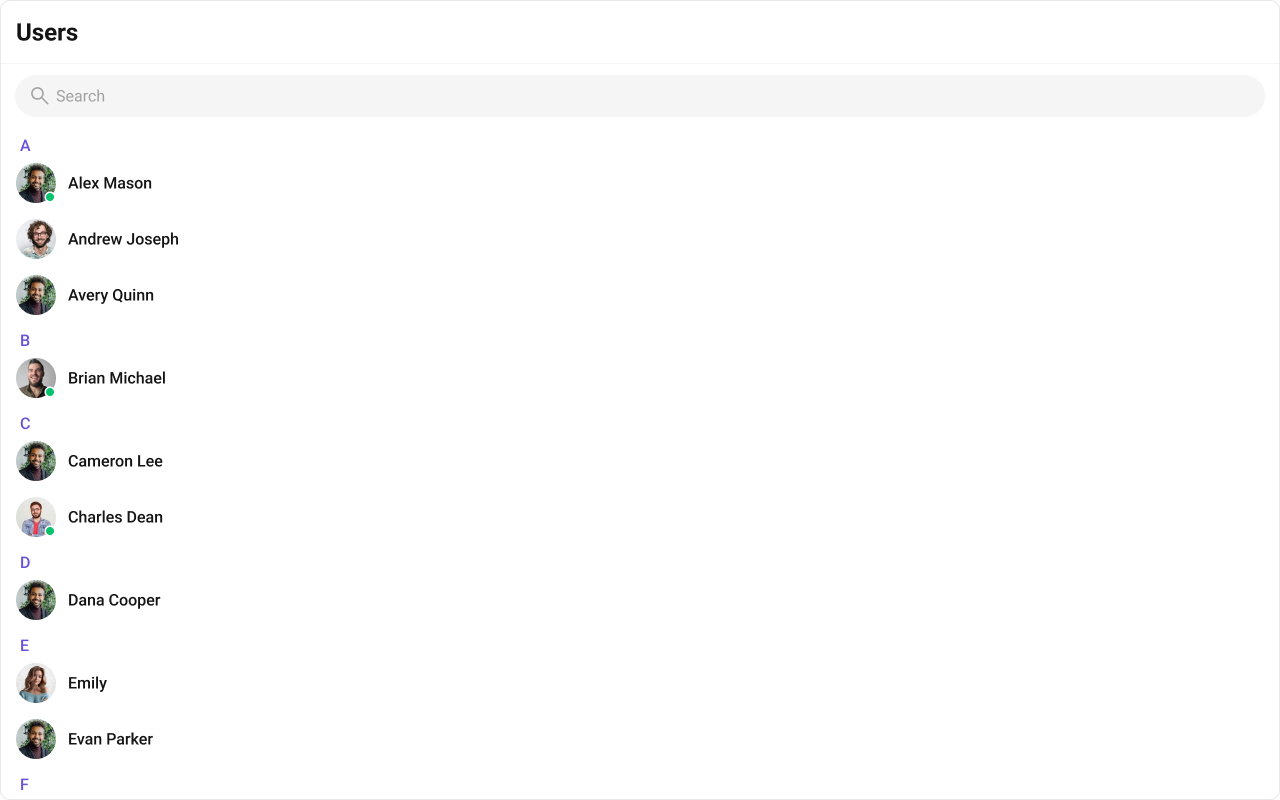
This renders a scrollable list with:
User avatars and names
Online/offline status indicators
Alphabetical section headers (A, B, C…)
Built-in search functionality
Step 2: Two-Panel Layout (Quick Start) For a complete chat experience with minimal code, use CometChatUsersWithMessages:
import { CometChatUsersWithMessages } from "@cometchat/chat-uikit-react" ; import "@cometchat/chat-uikit-react/css-variables.css" ; function UserChatApp () { return ( < div style = { { width: "100vw" , height: "100vh" } } > < CometChatUsersWithMessages /> </ div > ); } export default UserChatApp ;
This component handles:
User list rendering
User selection
Message view switching
Real-time presence updates
Step 3: Custom Two-Panel Layout For more control, build your own two-panel layout using individual components:
import { useState } from "react" ; import { CometChatUsers , CometChatMessageHeader , CometChatMessageList , CometChatMessageComposer , } from "@cometchat/chat-uikit-react" ; import { CometChat } from "@cometchat/chat-sdk-javascript" ; import "@cometchat/chat-uikit-react/css-variables.css" ; function CustomUserLayout () { const [ selectedUser , setSelectedUser ] = useState < CometChat . User >(); return ( < div style = { { display: "flex" , height: "100vh" , width: "100vw" } } > { /* User List Panel */ } < div style = { { width: 400 , height: "100%" , borderRight: "1px solid #eee" } } > < CometChatUsers onItemClick = { ( user : CometChat . User ) => setSelectedUser ( user ) } /> </ div > { /* Message Panel */ } { selectedUser ? ( < div style = { { flex: 1 , display: "flex" , flexDirection: "column" } } > < CometChatMessageHeader user = { selectedUser } /> < CometChatMessageList user = { selectedUser } /> < CometChatMessageComposer user = { selectedUser } /> </ div > ) : ( < div style = { { flex: 1 , display: "grid" , placeItems: "center" , background: "#f5f5f5" , color: "#727272" } } > Select a user to start messaging </ div > ) } </ div > ); } export default CustomUserLayout ;
Step 4: Filtering Users Use UsersRequestBuilder to filter which users appear:
import { CometChatUsers } from "@cometchat/chat-uikit-react" ; import { CometChat } from "@cometchat/chat-sdk-javascript" ; function FilteredUsers () { return ( < CometChatUsers usersRequestBuilder = { new CometChat . UsersRequestBuilder () . friendsOnly ( true ) // Only show friends . setLimit ( 20 ) // Limit to 20 per page } /> ); }
Pass the builder instance directly — not the result of .build(). The component calls .build() internally.
Common Filter Recipes Filter Code Friends only new CometChat.UsersRequestBuilder().friendsOnly(true)Online users only new CometChat.UsersRequestBuilder().setStatus("online")Limit results per page new CometChat.UsersRequestBuilder().setLimit(15)Search by keyword new CometChat.UsersRequestBuilder().setSearchKeyword("alice")Hide blocked users new CometChat.UsersRequestBuilder().hideBlockedUsers(true)Filter by roles new CometChat.UsersRequestBuilder().setRoles(["admin", "moderator"])Filter by tags new CometChat.UsersRequestBuilder().setTags(["vip"])Specific UIDs new CometChat.UsersRequestBuilder().setUIDs(["uid1", "uid2"])
See UsersRequestBuilder for the full API.
Step 5: Multi-Select Users Enable user selection for batch operations like creating group chats:
import { useState } from "react" ; import { CometChatUsers , SelectionMode , } from "@cometchat/chat-uikit-react" ; import { CometChat } from "@cometchat/chat-sdk-javascript" ; function MultiSelectUsers () { const [ selectedUsers , setSelectedUsers ] = useState < Set < string >>( new Set ()); const handleSelect = ( user : CometChat . User , isSelected : boolean ) => { setSelectedUsers (( prev ) => { const next = new Set ( prev ); const uid = user . getUid (); isSelected ? next . add ( uid ) : next . delete ( uid ); return next ; }); }; return ( < div > < CometChatUsers selectionMode = { SelectionMode . multiple } showSelectedUsersPreview = { true } onSelect = { handleSelect } /> < div style = { { padding: 16 } } > Selected: { selectedUsers . size } users </ div > </ div > ); } export default MultiSelectUsers ;
Selection modes:
SelectionMode.none — Default, no checkboxesSelectionMode.single — Single selection with radio buttonsSelectionMode.multiple — Multi-select with checkboxes
Step 6: Blocking and Unblocking Users Implement user blocking functionality:
import { CometChat } from "@cometchat/chat-sdk-javascript" ; import { CometChatUserEvents } from "@cometchat/chat-uikit-react" ; async function blockUser ( uid : string ) { try { await CometChat . blockUsers ([ uid ]); // Fetch the blocked user to emit the event const user = await CometChat . getUser ( uid ); CometChatUserEvents . ccUserBlocked . next ( user ); console . log ( "User blocked successfully" ); } catch ( error ) { console . error ( "Failed to block user:" , error ); } } async function unblockUser ( uid : string ) { try { await CometChat . unblockUsers ([ uid ]); // Fetch the unblocked user to emit the event const user = await CometChat . getUser ( uid ); CometChatUserEvents . ccUserUnblocked . next ( user ); console . log ( "User unblocked successfully" ); } catch ( error ) { console . error ( "Failed to unblock user:" , error ); } } // Usage // blockUser("user_uid"); // unblockUser("user_uid");
Add custom actions to the user list items:
import { CometChatUsers , CometChatOption , } from "@cometchat/chat-uikit-react" ; import { CometChat } from "@cometchat/chat-sdk-javascript" ; function CustomOptionsUsers () { const getOptions = ( user : CometChat . User ) => [ new CometChatOption ({ id: "message" , title: "Send Message" , onClick : () => console . log ( "Message" , user . getName ()), }), new CometChatOption ({ id: "call" , title: "Start Call" , onClick : () => console . log ( "Call" , user . getName ()), }), new CometChatOption ({ id: "block" , title: "Block User" , onClick : () => console . log ( "Block" , user . getUid ()), }), ]; return < CometChatUsers options = { getOptions } /> ; } export default CustomOptionsUsers ;
Complete Example Here’s a full implementation with user list, selection, and messaging:
import { useState } from "react" ; import { CometChatUsers , CometChatMessageHeader , CometChatMessageList , CometChatMessageComposer , CometChatOption , } from "@cometchat/chat-uikit-react" ; import { CometChat } from "@cometchat/chat-sdk-javascript" ; import "@cometchat/chat-uikit-react/css-variables.css" ; function UserChatComplete () { const [ selectedUser , setSelectedUser ] = useState < CometChat . User >(); const handleUserClick = ( user : CometChat . User ) => { setSelectedUser ( user ); }; const getOptions = ( user : CometChat . User ) => [ new CometChatOption ({ id: "view-profile" , title: "View Profile" , onClick : () => console . log ( "View profile:" , user . getName ()), }), new CometChatOption ({ id: "block" , title: "Block User" , onClick : async () => { await CometChat . blockUsers ([ user . getUid ()]); console . log ( "Blocked:" , user . getName ()); }, }), ]; return ( < div style = { { display: "flex" , height: "100vh" , width: "100vw" } } > { /* User List Panel */ } < div style = { { width: 400 , height: "100%" , borderRight: "1px solid #eee" } } > < CometChatUsers onItemClick = { handleUserClick } activeUser = { selectedUser } options = { getOptions } usersRequestBuilder = { new CometChat . UsersRequestBuilder () . hideBlockedUsers ( true ) . setLimit ( 30 ) } /> </ div > { /* Message Panel */ } { selectedUser ? ( < div style = { { flex: 1 , display: "flex" , flexDirection: "column" } } > < CometChatMessageHeader user = { selectedUser } /> < CometChatMessageList user = { selectedUser } /> < CometChatMessageComposer user = { selectedUser } /> </ div > ) : ( < div style = { { flex: 1 , display: "grid" , placeItems: "center" , background: "#f5f5f5" , color: "#727272" } } > Select a user to start messaging </ div > ) } </ div > ); } export default UserChatComplete ;
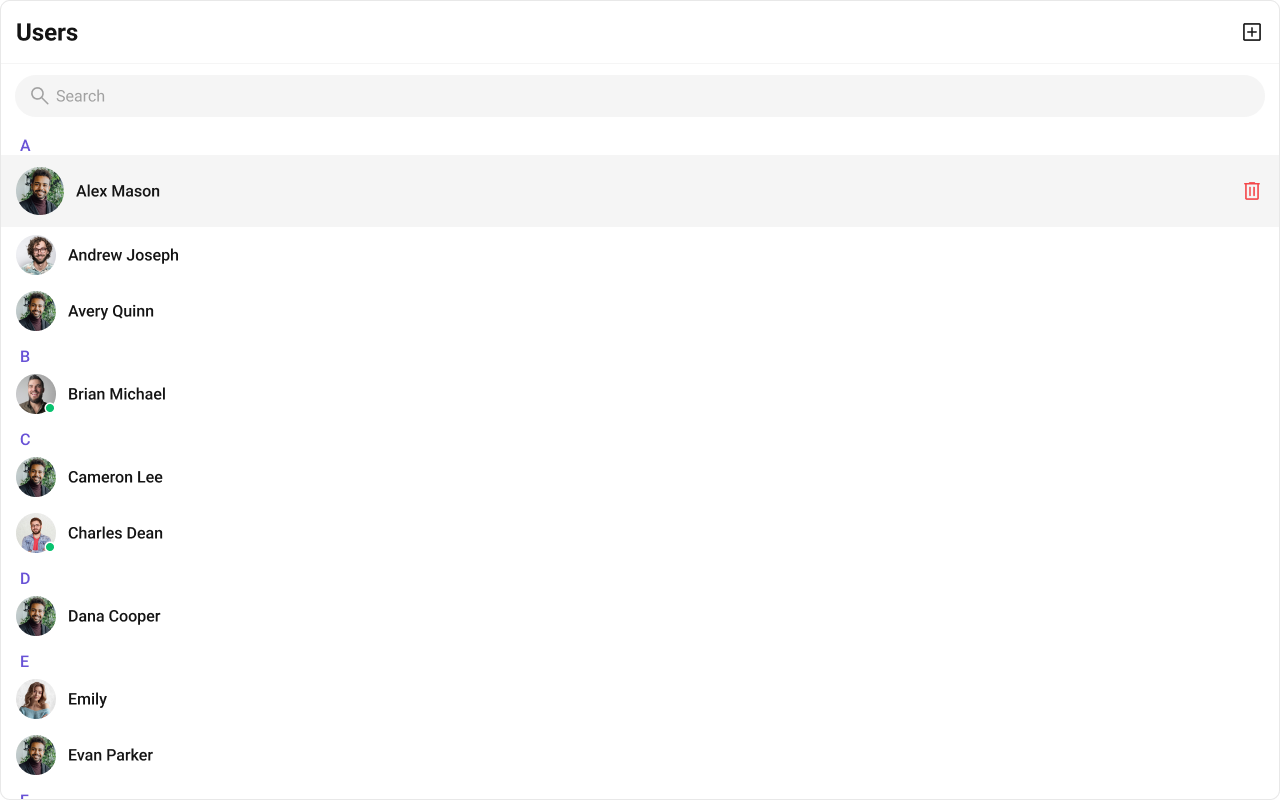
Custom User List Items Replace the entire user list item: import { CometChatUsers , CometChatListItem } from "@cometchat/chat-uikit-react" ; import { CometChat } from "@cometchat/chat-sdk-javascript" ; function CustomItemUsers () { const getItemView = ( user : CometChat . User ) => { const status = user . getStatus (); return ( < div className = { `cometchat-users__list-item cometchat-users__list-item- ${ status } ${ status === "online" ? `cometchat-users__list-item-active` : "" } ` } > < CometChatListItem title = { user . getName () } subtitleView = { status } avatarURL = { user . getAvatar () } avatarName = { user . getName () } /> </ div > ); }; return < CometChatUsers itemView = { getItemView } /> ; }
Replace the header bar: import { CometChatUsers , CometChatButton , getLocalizedString } from "@cometchat/chat-uikit-react" ; function CustomHeaderUsers () { return ( < CometChatUsers headerView = { < div style = { { display: "flex" , padding: "8px 16px" , justifyContent: "space-between" , alignItems: "center" } } > < h2 > { getLocalizedString ( "user_title" ) } </ h2 > < CometChatButton onClick = { () => console . log ( "Add user" ) } /> </ div > } /> ); }
Visibility Options Control which UI elements are visible: import { CometChatUsers } from "@cometchat/chat-uikit-react" ; function MinimalUsers () { return ( < CometChatUsers hideSearch = { true } // Hide search bar hideUserStatus = { true } // Hide online/offline indicators showSectionHeader = { false } // Hide alphabetical headers showScrollbar = { true } // Show scrollbar /> ); }
Custom Subtitle View Show additional user information: import { CometChatUsers } from "@cometchat/chat-uikit-react" ; import { CometChat } from "@cometchat/chat-sdk-javascript" ; function SubtitleViewUsers () { const getSubtitleView = ( user : CometChat . User ) => { return ( < div style = { { fontSize: 12 , color: "#727272" } } > Last Active: {new Date ( user . getLastActiveAt () * 1000 ). toLocaleString () } </ div > ); }; return < CometChatUsers subtitleView = { getSubtitleView } /> ; }
User Events Listen to user events for real-time updates: import { useEffect } from "react" ; import { CometChatUserEvents } from "@cometchat/chat-uikit-react" ; import { CometChat } from "@cometchat/chat-sdk-javascript" ; function useUserEvents () { useEffect (() => { const blockedSub = CometChatUserEvents . ccUserBlocked . subscribe ( ( user : CometChat . User ) => { console . log ( "User blocked:" , user . getName ()); } ); const unblockedSub = CometChatUserEvents . ccUserUnblocked . subscribe ( ( user : CometChat . User ) => { console . log ( "User unblocked:" , user . getName ()); } ); return () => { blockedSub ?. unsubscribe (); unblockedSub ?. unsubscribe (); }; }, []); }
Event Fires When ccUserBlockedA user is blocked ccUserUnblockedA user is unblocked
SDK Listeners (Automatic) The component automatically listens to these SDK events: SDK Listener Internal Behavior onUserOnlineUpdates the user’s status dot to online onUserOfflineUpdates the user’s status dot to offline
Key CSS Selectors Target Selector Users root .cometchat-usersHeader title .cometchat-users .cometchat-list__header-titleList item .cometchat-users__list-itemAvatar .cometchat-users__list-item .cometchat-avatarActive item .cometchat-users__list-item-active .cometchat-list-itemOnline status .cometchat-users__list-item-online .cometchat-list-item__statusEmpty state .cometchat-users__empty-state-viewSelected preview .cometchat-users__selected-preview
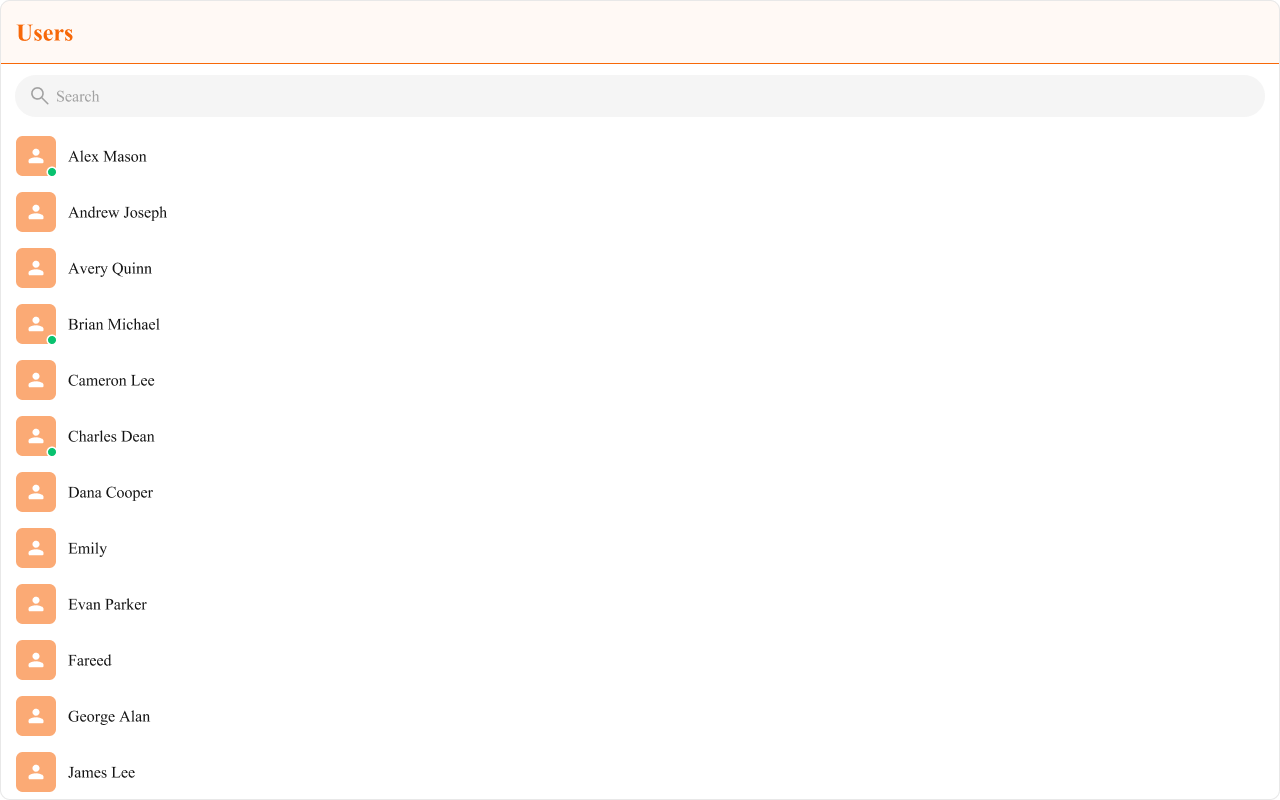
Example: Brand-Themed Users .cometchat .cometchat-users .cometchat-list__header-title { background-color : #edeafa ; color : #6852d6 ; border-bottom : 2 px solid #6852d6 ; } .cometchat .cometchat-users__list-item .cometchat-avatar { background-color : #aa9ee8 ; border-radius : 8 px ; } .cometchat .cometchat-users .cometchat-list-item__body-title { font-weight : 500 ; }
Common Issues Components must not render until CometChat is initialized and the user is logged in. Gate rendering with state checks.
Issue Solution Blank user list Ensure CometChatUIKit.init() and login() complete before rendering onItemClick not firingVerify the callback is passed correctly; check for JavaScript errors in console Status indicators not updating SDK listeners are automatic; ensure WebSocket connection is active Filter not working Pass the builder instance, not .build() result Selection not working Ensure selectionMode is set to single or multiple Blocked users still showing Use hideBlockedUsers(true) in the request builder Styles missing Add @import url("@cometchat/chat-uikit-react/css-variables.css"); to global CSS
For more help, see the Troubleshooting Guide or contact CometChat Support .
Next Steps