Field Value Package @cometchat/chat-uikit-reactPrimary Component CometChatGroups — scrollable list of available groupsCombined Component CometChatGroupsWithMessages — two-panel layout with groups + messagesMember Component CometChatGroupMembers — member list with management actionsCreate Component CometChatCreateGroup — group creation formJoin Component CometChatJoinGroup — handles joining password-protected groupsPrimary Output onItemClick: (group: CometChat.Group) => voidCSS Import @import url("@cometchat/chat-uikit-react/css-variables.css");CSS Root Class .cometchat-groupsFiltering groupsRequestBuilder prop accepts CometChat.GroupsRequestBuilder
Overview This guide shows you how to build group chat features in your React app. You’ll learn to display group lists, create and join groups, manage members, and handle group roles.
Time estimate: 20 minutes
Difficulty: IntermediatePrerequisites
React.js Integration completed (CometChat initialized and user logged in)Basic familiarity with React hooks (useState, useEffect)
Use Cases The Groups feature is ideal for:
Team collaboration — Create workspaces for teams with role-based accessCommunity chat — Public groups anyone can join and participate inPrivate channels — Password-protected or invite-only group conversationsSupport rooms — Moderated group chats with admin controls
Required Components Component Purpose CometChatGroupsScrollable list of available groups CometChatGroupsWithMessagesPre-built two-panel layout (groups + messages) CometChatGroupMembersMember list with kick, ban, and scope change actions CometChatCreateGroupForm for creating new groups CometChatJoinGroupHandles joining password-protected groups
Steps Step 1: Basic Group List Start with a simple group list that displays all available groups:
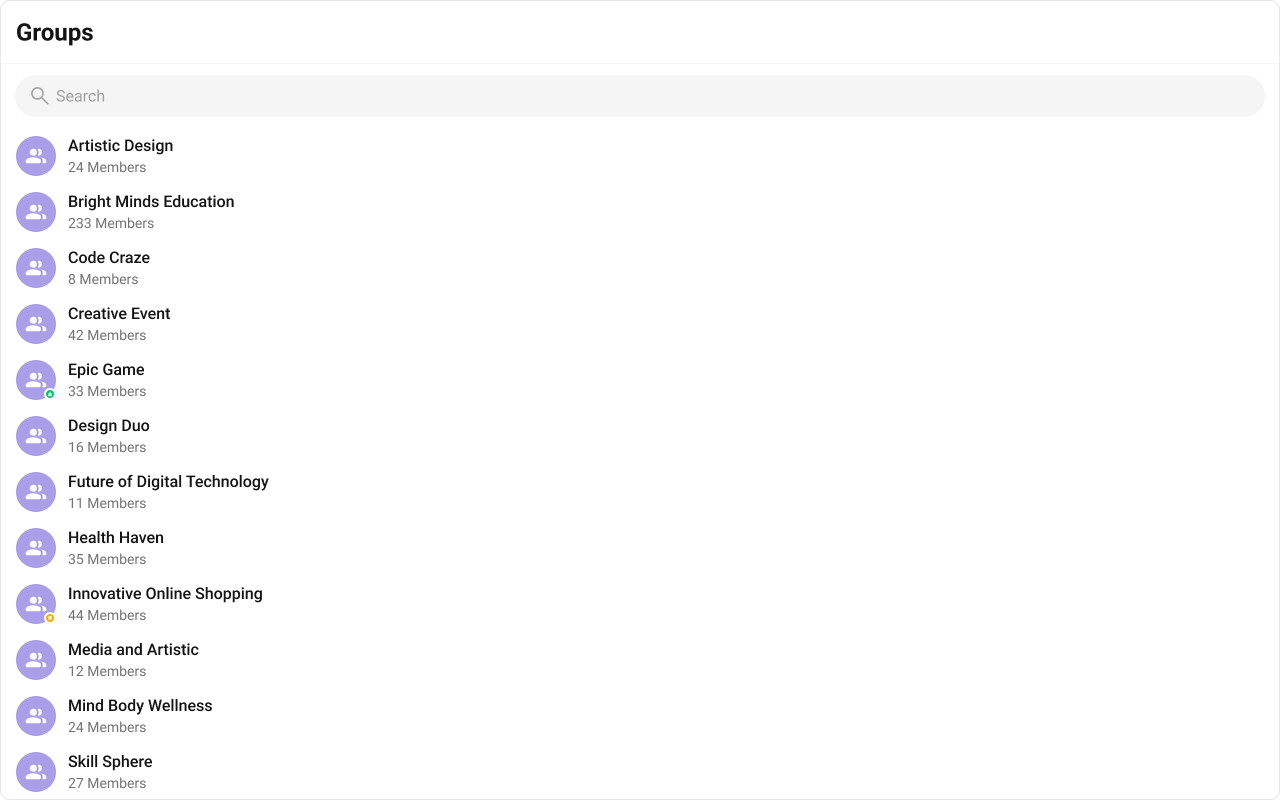
import { CometChatGroups } from "@cometchat/chat-uikit-react" ; import "@cometchat/chat-uikit-react/css-variables.css" ; function GroupList () { return ( < div style = { { width: "100%" , height: "100vh" } } > < CometChatGroups /> </ div > ); } export default GroupList ;
This renders a scrollable list with:
Group avatars and names
Member count
Group type indicators (public, private, password-protected)
Search functionality
Step 2: Two-Panel Layout (Quick Start) For a complete group chat experience with minimal code, use CometChatGroupsWithMessages:
import { CometChatGroupsWithMessages } from "@cometchat/chat-uikit-react" ; import "@cometchat/chat-uikit-react/css-variables.css" ; function GroupChatApp () { return ( < div style = { { width: "100vw" , height: "100vh" } } > < CometChatGroupsWithMessages /> </ div > ); } export default GroupChatApp ;
This component handles:
Group list rendering
Group selection
Message view switching
Real-time updates
Step 3: Custom Two-Panel Layout For more control, build your own two-panel layout using individual components:
import { useState } from "react" ; import { CometChatGroups , CometChatMessageHeader , CometChatMessageList , CometChatMessageComposer , } from "@cometchat/chat-uikit-react" ; import { CometChat } from "@cometchat/chat-sdk-javascript" ; import "@cometchat/chat-uikit-react/css-variables.css" ; function CustomGroupLayout () { const [ selectedGroup , setSelectedGroup ] = useState < CometChat . Group >(); return ( < div style = { { display: "flex" , height: "100vh" , width: "100vw" } } > { /* Group List Panel */ } < div style = { { width: 400 , height: "100%" , borderRight: "1px solid #eee" } } > < CometChatGroups onItemClick = { ( group : CometChat . Group ) => setSelectedGroup ( group ) } /> </ div > { /* Message Panel */ } { selectedGroup ? ( < div style = { { flex: 1 , display: "flex" , flexDirection: "column" } } > < CometChatMessageHeader group = { selectedGroup } /> < CometChatMessageList group = { selectedGroup } /> < CometChatMessageComposer group = { selectedGroup } /> </ div > ) : ( < div style = { { flex: 1 , display: "grid" , placeItems: "center" , background: "#f5f5f5" , color: "#727272" } } > Select a group to start messaging </ div > ) } </ div > ); } export default CustomGroupLayout ;
Step 4: Creating a New Group Create groups programmatically using the CometChat SDK:
import { useState } from "react" ; import { CometChat } from "@cometchat/chat-sdk-javascript" ; import { CometChatGroupEvents } from "@cometchat/chat-uikit-react" ; type GroupType = "public" | "private" | "password" ; function CreateGroup ({ onGroupCreated } : { onGroupCreated : ( group : CometChat . Group ) => void }) { const [ groupName , setGroupName ] = useState ( "" ); const [ groupType , setGroupType ] = useState < GroupType >( "public" ); const [ password , setPassword ] = useState ( "" ); const handleSubmit = async ( e : React . FormEvent ) => { e . preventDefault (); // Generate unique GUID const guid = `group_ ${ Date . now () } ` ; // Create group object const group = new CometChat . Group ( guid , groupName , groupType , groupType === "password" ? password : "" ); try { const createdGroup = await CometChat . createGroup ( group ); // Emit event so UI components update CometChatGroupEvents . ccGroupCreated . next ( createdGroup ); onGroupCreated ( createdGroup ); } catch ( error ) { console . error ( "Group creation failed:" , error ); } }; return ( < form onSubmit = { handleSubmit } style = { { padding: 20 } } > < div style = { { marginBottom: 16 } } > < label > Group Name </ label > < input type = "text" value = { groupName } onChange = { ( e ) => setGroupName ( e . target . value ) } required /> </ div > < div style = { { marginBottom: 16 } } > < label > Group Type </ label > < select value = { groupType } onChange = { ( e ) => setGroupType ( e . target . value as GroupType ) } > < option value = "public" > Public </ option > < option value = "private" > Private </ option > < option value = "password" > Password Protected </ option > </ select > </ div > { groupType === "password" && ( < div style = { { marginBottom: 16 } } > < label > Password </ label > < input type = "password" value = { password } onChange = { ( e ) => setPassword ( e . target . value ) } required /> </ div > ) } < button type = "submit" > Create Group </ button > </ form > ); } export default CreateGroup ;
Group types:
Public — Anyone can join without approvalPrivate — Users must be invited to joinPassword — Users need the password to join
Step 5: Joining Groups Handle joining for public and password-protected groups:
import { useState } from "react" ; import { CometChat } from "@cometchat/chat-sdk-javascript" ; import { CometChatGroupEvents , CometChatUIKitLoginListener } from "@cometchat/chat-uikit-react" ; function JoinGroup ({ group , onJoined } : { group : CometChat . Group ; onJoined : ( group : CometChat . Group ) => void }) { const [ password , setPassword ] = useState ( "" ); const [ error , setError ] = useState ( "" ); const handleJoin = async () => { try { const joinedGroup = await CometChat . joinGroup ( group . getGuid (), group . getType () as CometChat . GroupType , group . getType () === "password" ? password : "" ); // Emit event so UI components update const loggedInUser = CometChatUIKitLoginListener . getLoggedInUser (); CometChatGroupEvents . ccGroupMemberJoined . next ({ joinedGroup: joinedGroup , joinedUser: loggedInUser ! }); onJoined ( joinedGroup ); } catch ( err ) { setError ( "Failed to join group. Check the password and try again." ); } }; return ( < div style = { { padding: 20 } } > < h3 > Join { group . getName () } </ h3 > { group . getType () === "password" && ( < div style = { { marginBottom: 16 } } > < label > Password </ label > < input type = "password" value = { password } onChange = { ( e ) => setPassword ( e . target . value ) } placeholder = "Enter group password" /> </ div > ) } { error && < p style = { { color: "red" } } > { error } </ p > } < button onClick = { handleJoin } > Join Group </ button > </ div > ); } export default JoinGroup ;
For private groups, users cannot join directly — they must be added by an admin or moderator using CometChat.addMembersToGroup().
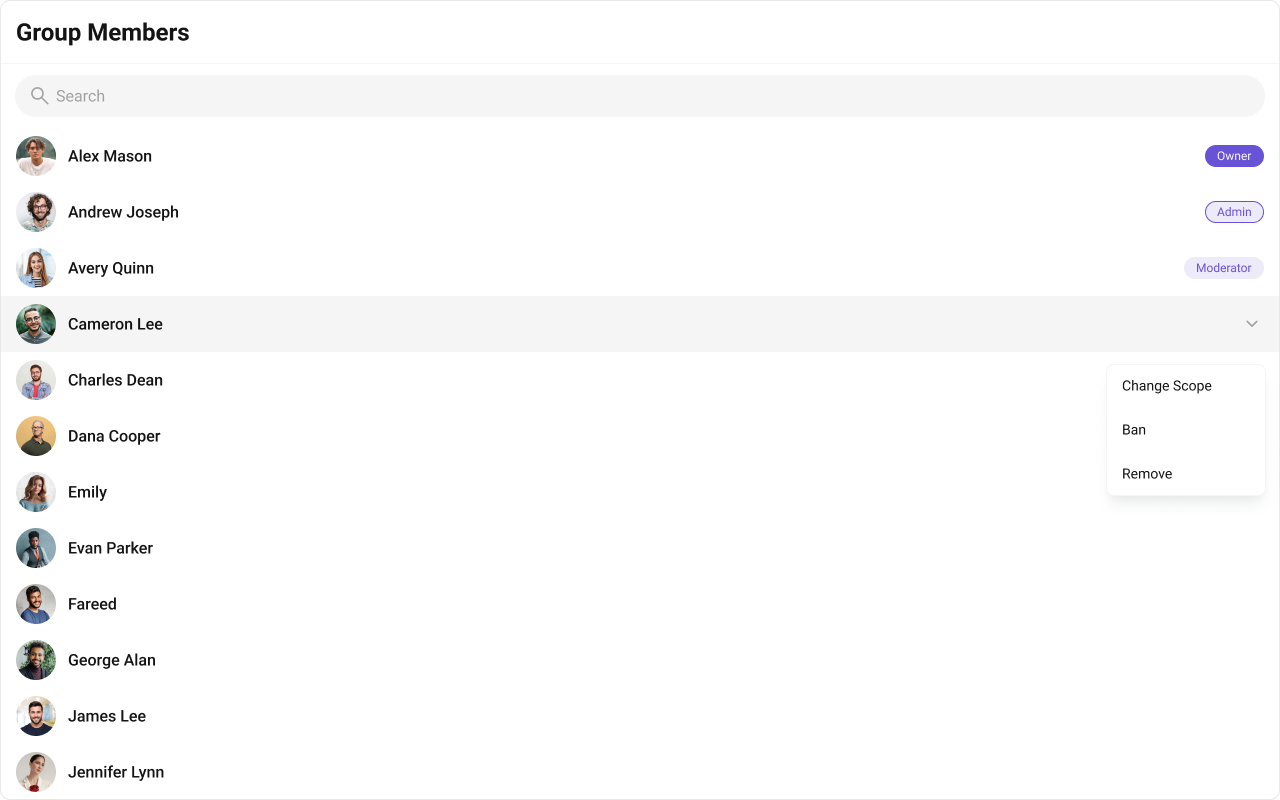
Step 6: Managing Group Members Display and manage group members using CometChatGroupMembers:
import { useEffect , useState } from "react" ; import { CometChatGroupMembers } from "@cometchat/chat-uikit-react" ; import { CometChat } from "@cometchat/chat-sdk-javascript" ; import "@cometchat/chat-uikit-react/css-variables.css" ; function GroupMembersPanel ({ groupId } : { groupId : string }) { const [ group , setGroup ] = useState < CometChat . Group >(); useEffect (() => { CometChat . getGroup ( groupId ). then ( setGroup ); }, [ groupId ]); if ( ! group ) return < div > Loading... </ div > ; return ( < div style = { { width: 300 , height: "100%" } } > < CometChatGroupMembers group = { group } onItemClick = { ( member : CometChat . GroupMember ) => { console . log ( "Selected member:" , member . getName ()); } } /> </ div > ); } export default GroupMembersPanel ;
The component provides built-in actions based on the logged-in user’s role:
Kick member — Remove a member from the groupBan member — Permanently block a member from rejoiningChange scope — Promote/demote members (admin, moderator, participant)
Step 7: Adding Members to a Group Add new members to an existing group:
import { useState } from "react" ; import { CometChat } from "@cometchat/chat-sdk-javascript" ; import { CometChatGroupEvents , CometChatUIKitLoginListener } from "@cometchat/chat-uikit-react" ; function AddMembers ({ group } : { group : CometChat . Group }) { const [ userIds , setUserIds ] = useState < string []>([]); const [ inputValue , setInputValue ] = useState ( "" ); const handleAddMembers = async () => { if ( userIds . length === 0 ) return ; try { // Create group member objects const members = userIds . map ( ( uid ) => new CometChat . GroupMember ( uid , CometChat . GROUP_MEMBER_SCOPE . PARTICIPANT ) ); await CometChat . addMembersToGroup ( group . getGuid (), members , []); // Emit event so UI components update CometChatGroupEvents . ccGroupMemberAdded . next ({ addedBy: CometChatUIKitLoginListener . getLoggedInUser () ! , usersAdded: members , userAddedIn: group }); setUserIds ([]); setInputValue ( "" ); } catch ( error ) { console . error ( "Failed to add members:" , error ); } }; const addUserId = () => { if ( inputValue && ! userIds . includes ( inputValue )) { setUserIds ([ ... userIds , inputValue ]); setInputValue ( "" ); } }; return ( < div style = { { padding: 20 } } > < h3 > Add Members to { group . getName () } </ h3 > < div style = { { marginBottom: 16 } } > < input type = "text" value = { inputValue } onChange = { ( e ) => setInputValue ( e . target . value ) } placeholder = "Enter user ID" /> < button onClick = { addUserId } > Add </ button > </ div > { userIds . length > 0 && ( < div style = { { marginBottom: 16 } } > < p > Users to add: </ p > < ul > { userIds . map (( uid ) => ( < li key = { uid } > { uid } </ li > )) } </ ul > </ div > ) } < button onClick = { handleAddMembers } disabled = { userIds . length === 0 } > Add Members </ button > </ div > ); } export default AddMembers ;
Step 8: Changing Member Scope Promote or demote members by changing their scope:
import { CometChat } from "@cometchat/chat-sdk-javascript" ; import { CometChatGroupEvents , CometChatUIKitLoginListener } from "@cometchat/chat-uikit-react" ; async function changeMemberScope ( group : CometChat . Group , member : CometChat . GroupMember , newScope : string ) { try { await CometChat . updateGroupMemberScope ( group . getGuid (), member . getUid (), newScope as CometChat . GroupMemberScope ); // Emit event so UI components update CometChatGroupEvents . ccGroupMemberScopeChanged . next ({ action: CometChat . ACTION_TYPE . SCOPE_CHANGE , actionBy: CometChatUIKitLoginListener . getLoggedInUser () ! , updatedUser: member , scopeChangedTo: newScope , scopeChangedFrom: member . getScope (), group: group }); console . log ( ` ${ member . getName () } is now a ${ newScope } ` ); } catch ( error ) { console . error ( "Failed to change scope:" , error ); } } // Usage example // changeMemberScope(group, member, CometChat.GROUP_MEMBER_SCOPE.ADMIN);
Available scopes:
CometChat.GROUP_MEMBER_SCOPE.ADMIN — Full control over group settings and membersCometChat.GROUP_MEMBER_SCOPE.MODERATOR — Can manage members but not group settingsCometChat.GROUP_MEMBER_SCOPE.PARTICIPANT — Regular member with no management permissions
Step 9: Filtering Groups Use GroupsRequestBuilder to filter which groups appear:
import { CometChatGroups } from "@cometchat/chat-uikit-react" ; import { CometChat } from "@cometchat/chat-sdk-javascript" ; function FilteredGroups () { return ( < CometChatGroups groupsRequestBuilder = { new CometChat . GroupsRequestBuilder () . joinedOnly ( true ) // Only show groups user has joined . setLimit ( 20 ) // Limit to 20 per page } /> ); }
Pass the builder instance directly — not the result of .build(). The component calls .build() internally.
Common Filter Recipes Filter Code Joined groups only new CometChat.GroupsRequestBuilder().joinedOnly(true)Limit results per page new CometChat.GroupsRequestBuilder().setLimit(10)Search by keyword new CometChat.GroupsRequestBuilder().setSearchKeyword("team")Filter by tags new CometChat.GroupsRequestBuilder().setTags(["vip"])Include tags data new CometChat.GroupsRequestBuilder().withTags(true)
See GroupsRequestBuilder for the full API.
Complete Example Here’s a full implementation with group list, creation, and member management:
import { useState } from "react" ; import { CometChatGroups , CometChatGroupMembers , CometChatMessageHeader , CometChatMessageList , CometChatMessageComposer , CometChatGroupEvents , } from "@cometchat/chat-uikit-react" ; import { CometChat } from "@cometchat/chat-sdk-javascript" ; import "@cometchat/chat-uikit-react/css-variables.css" ; function GroupChatComplete () { const [ selectedGroup , setSelectedGroup ] = useState < CometChat . Group >(); const [ showMembers , setShowMembers ] = useState ( false ); const [ showCreateGroup , setShowCreateGroup ] = useState ( false ); const handleGroupClick = ( group : CometChat . Group ) => { setSelectedGroup ( group ); setShowMembers ( false ); }; const handleCreateGroup = async ( name : string , type : string , password : string ) => { const guid = `group_ ${ Date . now () } ` ; const group = new CometChat . Group ( guid , name , type , password ); try { const createdGroup = await CometChat . createGroup ( group ); CometChatGroupEvents . ccGroupCreated . next ( createdGroup ); setSelectedGroup ( createdGroup ); setShowCreateGroup ( false ); } catch ( error ) { console . error ( "Group creation failed:" , error ); } }; return ( < div style = { { display: "flex" , height: "100vh" , width: "100vw" } } > { /* Group List Panel */ } < div style = { { width: 400 , height: "100%" , borderRight: "1px solid #eee" } } > < CometChatGroups onItemClick = { handleGroupClick } activeGroup = { selectedGroup } /> </ div > { /* Message Panel */ } { selectedGroup ? ( < div style = { { flex: 1 , display: "flex" , flexDirection: "column" } } > < CometChatMessageHeader group = { selectedGroup } onDetailsClick = { () => setShowMembers ( ! showMembers ) } /> < div style = { { flex: 1 , display: "flex" } } > < div style = { { flex: 1 , display: "flex" , flexDirection: "column" } } > < CometChatMessageList group = { selectedGroup } /> < CometChatMessageComposer group = { selectedGroup } /> </ div > { showMembers && ( < div style = { { width: 300 , borderLeft: "1px solid #eee" } } > < CometChatGroupMembers group = { selectedGroup } /> </ div > ) } </ div > </ div > ) : ( < div style = { { flex: 1 , display: "grid" , placeItems: "center" , background: "#f5f5f5" , color: "#727272" } } > Select a group to start messaging </ div > ) } </ div > ); } export default GroupChatComplete ;
Custom Group List Items Replace the entire group list item: import { CometChatGroups } from "@cometchat/chat-uikit-react" ; import { CometChat } from "@cometchat/chat-sdk-javascript" ; function CustomItemGroups () { const getItemView = ( group : CometChat . Group ) => { return ( < div style = { { display: "flex" , padding: "8px 16px" , alignItems: "center" , gap: 12 } } > < div style = { { width: 40 , height: 40 , borderRadius: 8 , background: "#eee" } } /> < div > < div style = { { fontWeight: 500 } } > { group . getName () } </ div > < div style = { { fontSize: 12 , color: "#727272" } } > { group . getMembersCount () } members • { group . getType () } </ div > </ div > </ div > ); }; return < CometChatGroups itemView = { getItemView } /> ; }
Replace the header bar: import { CometChatGroups , CometChatButton , getLocalizedString } from "@cometchat/chat-uikit-react" ; function CustomHeaderGroups () { return ( < CometChatGroups headerView = { < div style = { { display: "flex" , padding: "8px 16px" , justifyContent: "space-between" , alignItems: "center" } } > < h2 > { getLocalizedString ( "GROUPS" ) } </ h2 > < CometChatButton onClick = { () => console . log ( "Create group" ) } /> </ div > } /> ); }
Visibility Options Control which UI elements are visible: import { CometChatGroups } from "@cometchat/chat-uikit-react" ; function MinimalGroups () { return ( < CometChatGroups hideSearch = { true } // Hide search bar hideGroupType = { true } // Hide group type icons showScrollbar = { true } // Show scrollbar /> ); }
Replace the hover/context menu actions: import { CometChatGroups , CometChatOption } from "@cometchat/chat-uikit-react" ; import { CometChat } from "@cometchat/chat-sdk-javascript" ; function CustomOptionsGroups () { const getOptions = ( group : CometChat . Group ) => [ new CometChatOption ({ title: "Leave Group" , id: "leave" , onClick : () => console . log ( "Leave" , group . getGuid ()), }), new CometChatOption ({ title: "Mute Notifications" , id: "mute" , onClick : () => console . log ( "Mute" , group . getGuid ()), }), ]; return < CometChatGroups options = { getOptions } /> ; }
Hide Member Management Actions For read-only member lists: import { CometChatGroupMembers } from "@cometchat/chat-uikit-react" ; import { CometChat } from "@cometchat/chat-sdk-javascript" ; function ReadOnlyMembers ({ group } : { group : CometChat . Group }) { return ( < CometChatGroupMembers group = { group } hideKickMemberOption = { true } hideBanMemberOption = { true } hideScopeChangeOption = { true } /> ); }
Group Events Listen to group events for real-time updates: import { useEffect } from "react" ; import { CometChatGroupEvents } from "@cometchat/chat-uikit-react" ; import { CometChat } from "@cometchat/chat-sdk-javascript" ; function useGroupEvents () { useEffect (() => { const createdSub = CometChatGroupEvents . ccGroupCreated . subscribe ( ( group : CometChat . Group ) => { console . log ( "Group created:" , group . getName ()); } ); const deletedSub = CometChatGroupEvents . ccGroupDeleted . subscribe ( ( group : CometChat . Group ) => { console . log ( "Group deleted:" , group . getName ()); } ); const memberJoinedSub = CometChatGroupEvents . ccGroupMemberJoined . subscribe ( ( item ) => { console . log ( "Member joined:" , item . joinedUser . getName ()); } ); const memberKickedSub = CometChatGroupEvents . ccGroupMemberKicked . subscribe ( ( item ) => { console . log ( "Member kicked:" , item . kickedUser . getName ()); } ); const scopeChangedSub = CometChatGroupEvents . ccGroupMemberScopeChanged . subscribe ( ( item ) => { console . log ( "Scope changed:" , item . updatedUser . getName (), "to" , item . scopeChangedTo ); } ); return () => { createdSub ?. unsubscribe (); deletedSub ?. unsubscribe (); memberJoinedSub ?. unsubscribe (); memberKickedSub ?. unsubscribe (); scopeChangedSub ?. unsubscribe (); }; }, []); }
Event Fires When ccGroupCreatedA new group is created ccGroupDeletedA group is deleted ccGroupMemberJoinedA user joins a group ccGroupLeftA user leaves a group ccGroupMemberAddedMembers are added to a group ccGroupMemberKickedA member is kicked ccGroupMemberBannedA member is banned ccGroupMemberScopeChangedA member’s scope changes ccOwnershipChangedGroup ownership is transferred
Key CSS Selectors Target Selector Groups root .cometchat-groupsHeader title .cometchat-groups .cometchat-list__header-titleList item .cometchat-groups .cometchat-list-itemAvatar .cometchat-groups__list-item .cometchat-avatarActive item .cometchat-groups__list-item-active .cometchat-list-itemGroup members root .cometchat-group-membersScope badge .cometchat-group-members__trailing-view-options
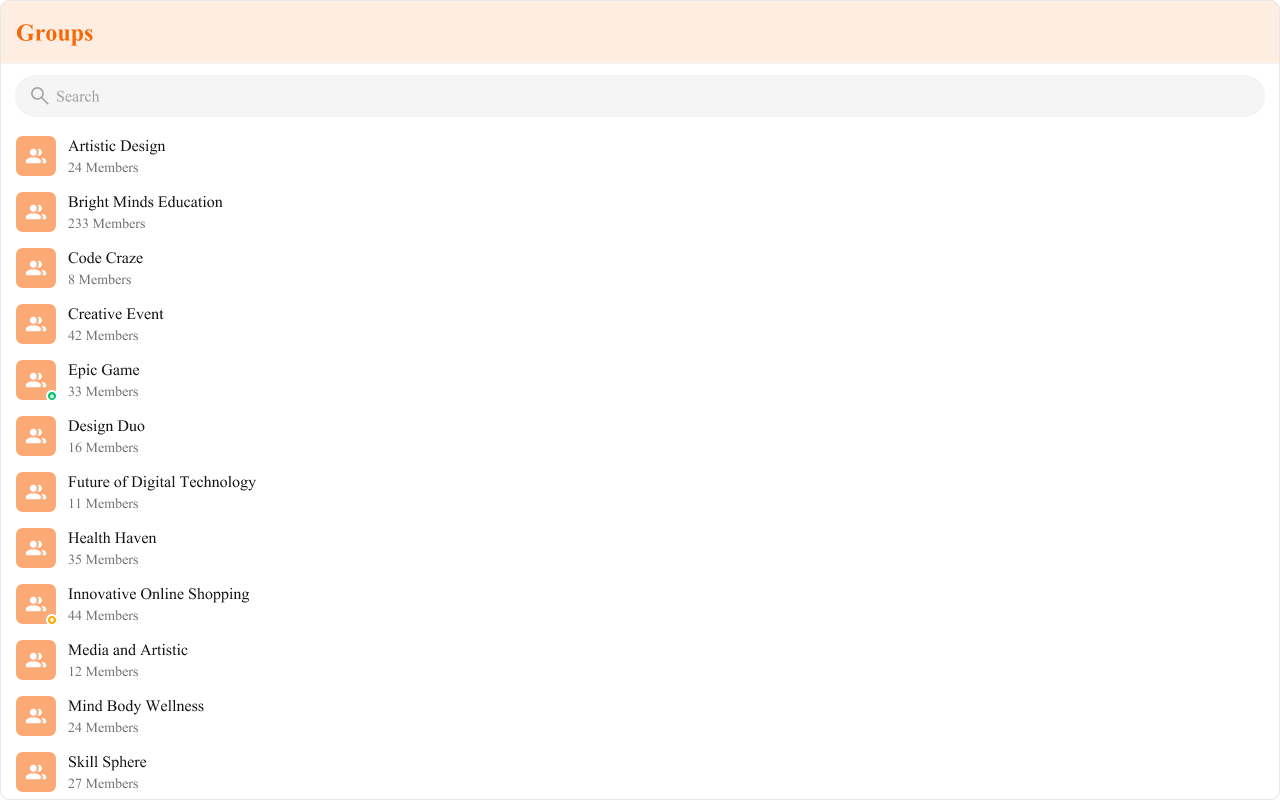
Example: Brand-Themed Groups .cometchat-groups .cometchat-list__header-title { background-color : #edeafa ; color : #6852d6 ; border-bottom : 2 px solid #6852d6 ; } .cometchat-groups__list-item .cometchat-avatar { background-color : #aa9ee8 ; border-radius : 8 px ; } .cometchat-groups .cometchat-list-item__body-title { font-weight : 500 ; }
Common Issues Components must not render until CometChat is initialized and the user is logged in. Gate rendering with state checks.
Issue Solution Blank group list Ensure CometChatUIKit.init() and login() complete before rendering onItemClick not firingVerify the callback is passed correctly; check for JavaScript errors in console Cannot join password group Ensure the correct password is provided; check group type is “password” Member actions not showing Verify logged-in user has admin/moderator scope in the group Scope change failing Only admins can change member scopes; check user permissions Group not updating after creation Emit ccGroupCreated event after CometChat.createGroup() succeeds Filter not working Pass the builder instance, not .build() result Styles missing Add @import url("@cometchat/chat-uikit-react/css-variables.css"); to global CSS
For more help, see the Troubleshooting Guide or contact CometChat Support .
Next Steps