

AI Agent Component Spec
AI Agent Component Spec
Report incorrect code
Copy
Ask AI
{
  "component": "CometChatOutgoingCall",
  "package": "@cometchat/chat-uikit-react",
  "import": "import { CometChatOutgoingCall } from \"@cometchat/chat-uikit-react\";",
  "cssImport": "import \"@cometchat/chat-uikit-react/css-variables.css\";",
  "description": "Overlay component displaying an outgoing voice/video call with recipient info and cancel control.",
  "cssRootClass": ".cometchat-outgoing-call",
  "primaryOutput": {
    "prop": "onCallCanceled",
    "type": "Function"
  },
  "props": {
    "data": {
      "call": { "type": "CometChat.Call", "default": "undefined" }
    },
    "callbacks": {
      "onCallCanceled": "Function",
      "onError": "((error: CometChat.CometChatException) => void) | null"
    },
    "sound": {
      "disableSoundForCalls": { "type": "boolean", "default": false },
      "customSoundForCalls": { "type": "string", "default": "built-in" }
    },
    "viewSlots": {
      "titleView": "JSX.Element",
      "subtitleView": "JSX.Element",
      "avatarView": "JSX.Element",
      "cancelButtonView": "JSX.Element"
    }
  },
  "events": [
    { "name": "CometChatCallEvents.ccOutgoingCall", "payload": "CometChat.Call" },
    { "name": "CometChatCallEvents.ccCallAccepted", "payload": "CometChat.Call" },
    { "name": "CometChatCallEvents.ccCallRejected", "payload": "CometChat.Call" },
    { "name": "CometChatCallEvents.ccCallEnded", "payload": "CometChat.Call" }
  ]
}
Overview
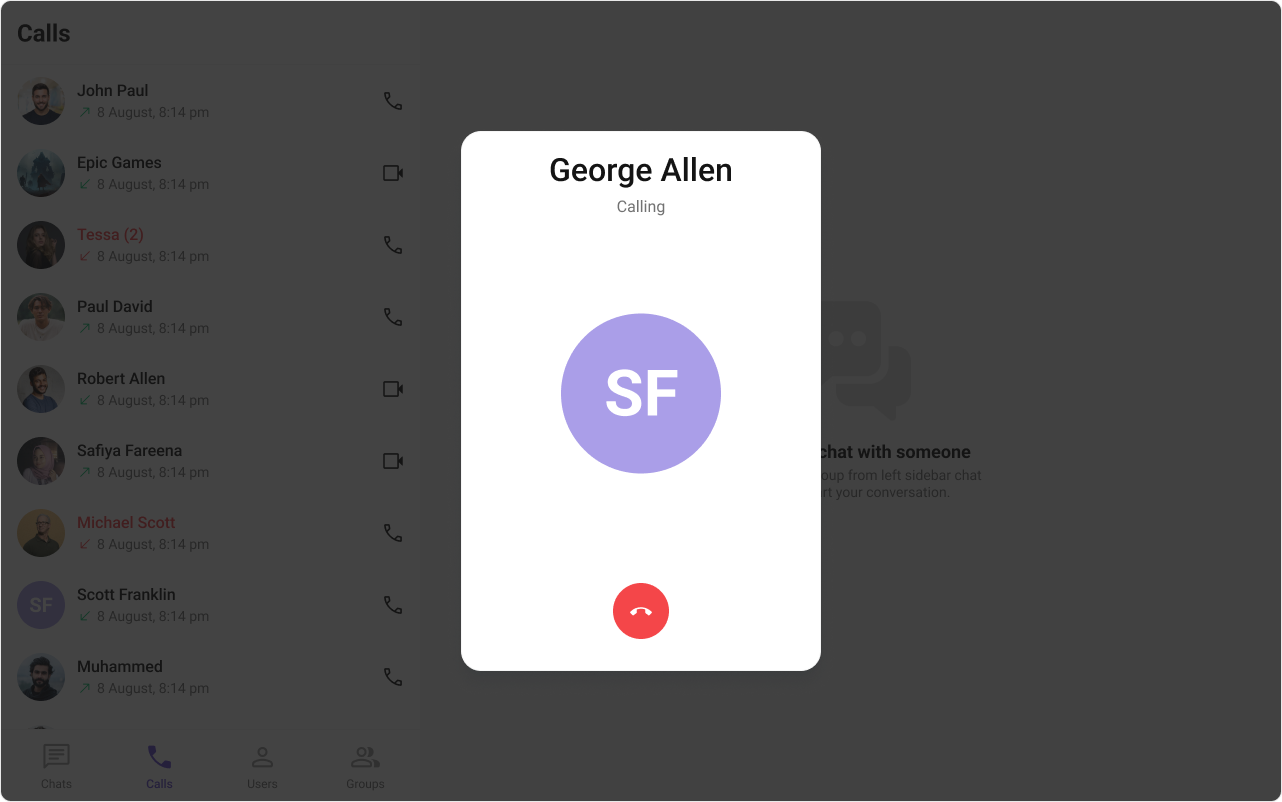
The outgoing call component displays a full-screen overlay when your user initiates a call. It shows the recipient’s information, plays a ringtone, and provides a cancel button. The component requires aCometChat.Call object from CometChat.initiateCall().
Time estimate: 15 minutesDifficulty: Intermediate
Prerequisites
- React.js integration completed
- Voice/Video calling guide reviewed
- CometChat Calls SDK initialized
Steps
Step 1: Initiate a call and display the outgoing screen
Create a call object and pass it to the component:Report incorrect code
Copy
Ask AI
import { useState, useEffect } from "react";
import { CometChat } from "@cometchat/chat-sdk-javascript";
import {
  CometChatOutgoingCall,
  CometChatUIKitConstants,
} from "@cometchat/chat-uikit-react";
import "@cometchat/chat-uikit-react/css-variables.css";

function OutgoingCallDemo() {
  const [call, setCall] = useState<CometChat.Call>();

  const startCall = async (userId: string, isVideo: boolean) => {
    const callType = isVideo
      ? CometChatUIKitConstants.MessageTypes.video
      : CometChatUIKitConstants.MessageTypes.audio;

    const callObject = new CometChat.Call(
      userId,
      callType,
      CometChatUIKitConstants.MessageReceiverType.user
    );

    try {
      const initiatedCall = await CometChat.initiateCall(callObject);
      setCall(initiatedCall);
    } catch (error) {
      console.error("Failed to initiate call:", error);
    }
  };

  return (
    <div>
      <button onClick={() => startCall("user_id", false)}>Voice Call</button>
      <button onClick={() => startCall("user_id", true)}>Video Call</button>

      {call && <CometChatOutgoingCall call={call} />}
    </div>
  );
}
Step 2: Handle call cancellation
End the call session when the user cancels:Report incorrect code
Copy
Ask AI
import { useState } from "react";
import { CometChat } from "@cometchat/chat-sdk-javascript";
import { CometChatOutgoingCall } from "@cometchat/chat-uikit-react";

function OutgoingCallWithCancel() {
  const [call, setCall] = useState<CometChat.Call>();

  const handleCancel = async () => {
    if (call) {
      await CometChat.endCall(call.getSessionId());
      setCall(undefined);
    }
  };

  return call ? (
    <CometChatOutgoingCall
      call={call}
      onCallCanceled={handleCancel}
      onError={(error) => console.error("Call error:", error)}
    />
  ) : null;
}
Step 3: Listen for call acceptance
Subscribe to events to know when the recipient answers:Report incorrect code
Copy
Ask AI
import { useEffect } from "react";
import { CometChatCallEvents } from "@cometchat/chat-uikit-react";
import { CometChat } from "@cometchat/chat-sdk-javascript";

function useOutgoingCallEvents(onAccepted: (call: CometChat.Call) => void) {
  useEffect(() => {
    const acceptedSub = CometChatCallEvents.ccCallAccepted.subscribe(
      (call: CometChat.Call) => {
        console.log("Call accepted, starting session...");
        onAccepted(call);
      }
    );

    const rejectedSub = CometChatCallEvents.ccCallRejected.subscribe(
      (call: CometChat.Call) => {
        console.log("Call was rejected");
      }
    );

    return () => {
      acceptedSub?.unsubscribe();
      rejectedSub?.unsubscribe();
    };
  }, [onAccepted]);
}
Step 4: Customize the ringtone
Report incorrect code
Copy
Ask AI
// Custom ringtone
<CometChatOutgoingCall
  call={call}
  customSoundForCalls="/sounds/outgoing-ring.mp3"
/>

// Silent mode
<CometChatOutgoingCall
  call={call}
  disableSoundForCalls={true}
/>
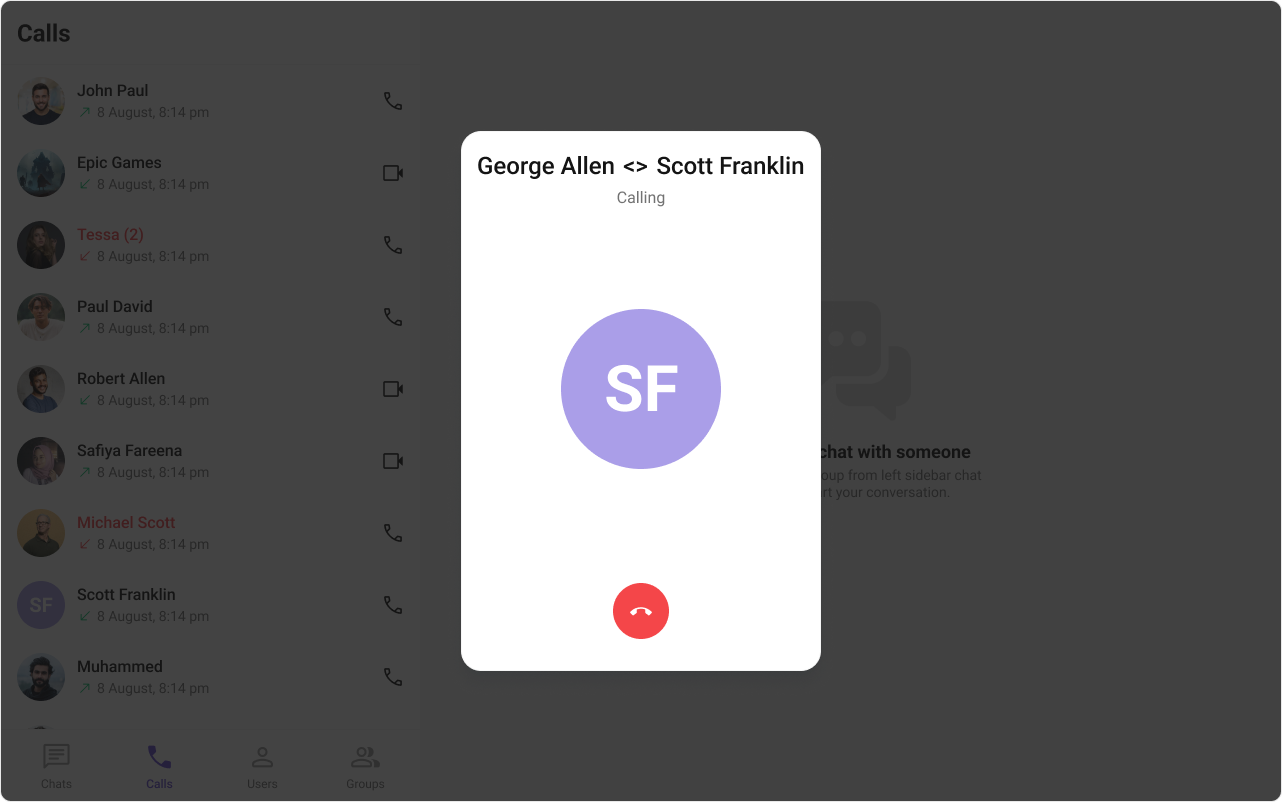
Step 5: Customize the UI with view slots
Replace parts of the outgoing call screen:- TypeScript
- CSS
Report incorrect code
Copy
Ask AI
import { CometChat } from "@cometchat/chat-sdk-javascript";
import { CometChatOutgoingCall, CometChatAvatar } from "@cometchat/chat-uikit-react";

function CustomOutgoingCall({ call }: { call: CometChat.Call }) {
  return (
    <CometChatOutgoingCall
      call={call}
      titleView={
        <div className="outgoing-title">
          {call.getCallInitiator().getName()} → {call.getCallReceiver().getName()}
        </div>
      }
      subtitleView={
        <div className="outgoing-subtitle">
          <span className="pulse-dot" />
          Calling...
        </div>
      }
      avatarView={
        <div className="outgoing-avatar">
          <CometChatAvatar
            name={call.getCallReceiver()?.getName()}
            image={(call.getCallReceiver() as CometChat.User)?.getAvatar()}
          />
        </div>
      }
    />
  );
}
Report incorrect code
Copy
Ask AI
.outgoing-title {
  color: #141414;
  text-align: center;
  font: 500 24px Roboto;
}

.outgoing-subtitle {
  display: flex;
  align-items: center;
  gap: 8px;
  color: #727272;
  font: 400 16px Roboto;
}

.pulse-dot {
  width: 8px;
  height: 8px;
  background: #6852d6;
  border-radius: 50%;
  animation: pulse 1.5s infinite;
}

@keyframes pulse {
  0%, 100% { opacity: 1; }
  50% { opacity: 0.5; }
}

.outgoing-avatar .cometchat-avatar {
  width: 160px;
  height: 160px;
  border-radius: 20px;
}
Complete Example
Report incorrect code
Copy
Ask AI
import { useState, useEffect } from "react";
import { CometChat } from "@cometchat/chat-sdk-javascript";
import {
  CometChatOutgoingCall,
  CometChatCallEvents,
  CometChatUIKitConstants,
} from "@cometchat/chat-uikit-react";
import "@cometchat/chat-uikit-react/css-variables.css";

function CallManager() {
  const [outgoingCall, setOutgoingCall] = useState<CometChat.Call>();

  // Listen for call events
  useEffect(() => {
    const acceptedSub = CometChatCallEvents.ccCallAccepted.subscribe((call) => {
      console.log("Call accepted, transitioning to active call...");
      setOutgoingCall(undefined);
      // Navigate to ongoing call screen
    });

    const rejectedSub = CometChatCallEvents.ccCallRejected.subscribe((call) => {
      console.log("Call was rejected");
      setOutgoingCall(undefined);
    });

    return () => {
      acceptedSub?.unsubscribe();
      rejectedSub?.unsubscribe();
    };
  }, []);

  const initiateCall = async (userId: string) => {
    const callObject = new CometChat.Call(
      userId,
      CometChatUIKitConstants.MessageTypes.audio,
      CometChatUIKitConstants.MessageReceiverType.user
    );

    try {
      const call = await CometChat.initiateCall(callObject);
      setOutgoingCall(call);
    } catch (error) {
      console.error("Failed to start call:", error);
    }
  };

  const cancelCall = async () => {
    if (outgoingCall) {
      await CometChat.endCall(outgoingCall.getSessionId());
      setOutgoingCall(undefined);
    }
  };

  return (
    <div>
      <button onClick={() => initiateCall("recipient_uid")}>
        Start Call
      </button>

      {outgoingCall && (
        <CometChatOutgoingCall
          call={outgoingCall}
          onCallCanceled={cancelCall}
          onError={(error) => console.error("Error:", error)}
        />
      )}
    </div>
  );
}

export default CallManager;
Advanced: Custom cancel button
Advanced: Custom cancel button
Replace the cancel button with your own design:
Report incorrect code
Copy
Ask AI
<CometChatOutgoingCall
  call={call}
  cancelButtonView={
    <button
      className="custom-cancel-btn"
      onClick={() => CometChat.endCall(call.getSessionId())}
    >
      <span>🔴</span> End Call
    </button>
  }
/>
Common Issues
The
call prop must be a valid CometChat.Call object returned from CometChat.initiateCall(). The component renders nothing if call is undefined.| Issue | Solution |
|---|---|
| Screen not showing | Ensure call prop is set after initiateCall() resolves |
| Ringtone not playing | Check browser autoplay policies |
| Cancel not working | Implement onCallCanceled to call CometChat.endCall() |