Field Value Package @cometchat/chat-uikit-reactPrimary Component CometChatSearch — dual-scope search across conversations and messagesPrimary Output onConversationClicked, onMessageClicked callbacksCSS Import @import url("@cometchat/chat-uikit-react/css-variables.css");CSS Root Class .cometchat-searchSearch Scopes CometChatSearchScope.Conversations, CometChatSearchScope.Messages
Overview This guide shows you how to build search functionality in your React app. You’ll learn to search across conversations and messages, apply filters, scope searches to specific users or groups, and handle search result navigation.
Time estimate: 15 minutes
Difficulty: BeginnerPrerequisites
React.js Integration completed (CometChat initialized and user logged in)Basic familiarity with React hooks (useState)
Use Cases The Search feature is ideal for:
Finding conversations — Quickly locate specific chats by name or contentMessage search — Find specific messages across all conversationsMedia discovery — Search for photos, videos, documents, and linksContextual search — Search within a specific user or group conversation
Required Components Component Purpose CometChatSearchUnified search panel with filters and results
Steps Step 1: Basic Search Panel Start with a simple search panel that searches across all conversations and messages:
import { CometChatSearch } from "@cometchat/chat-uikit-react" ; import "@cometchat/chat-uikit-react/css-variables.css" ; function SearchPanel () { return ( < div style = { { width: "100%" , height: "100vh" } } > < CometChatSearch /> </ div > ); } export default SearchPanel ;
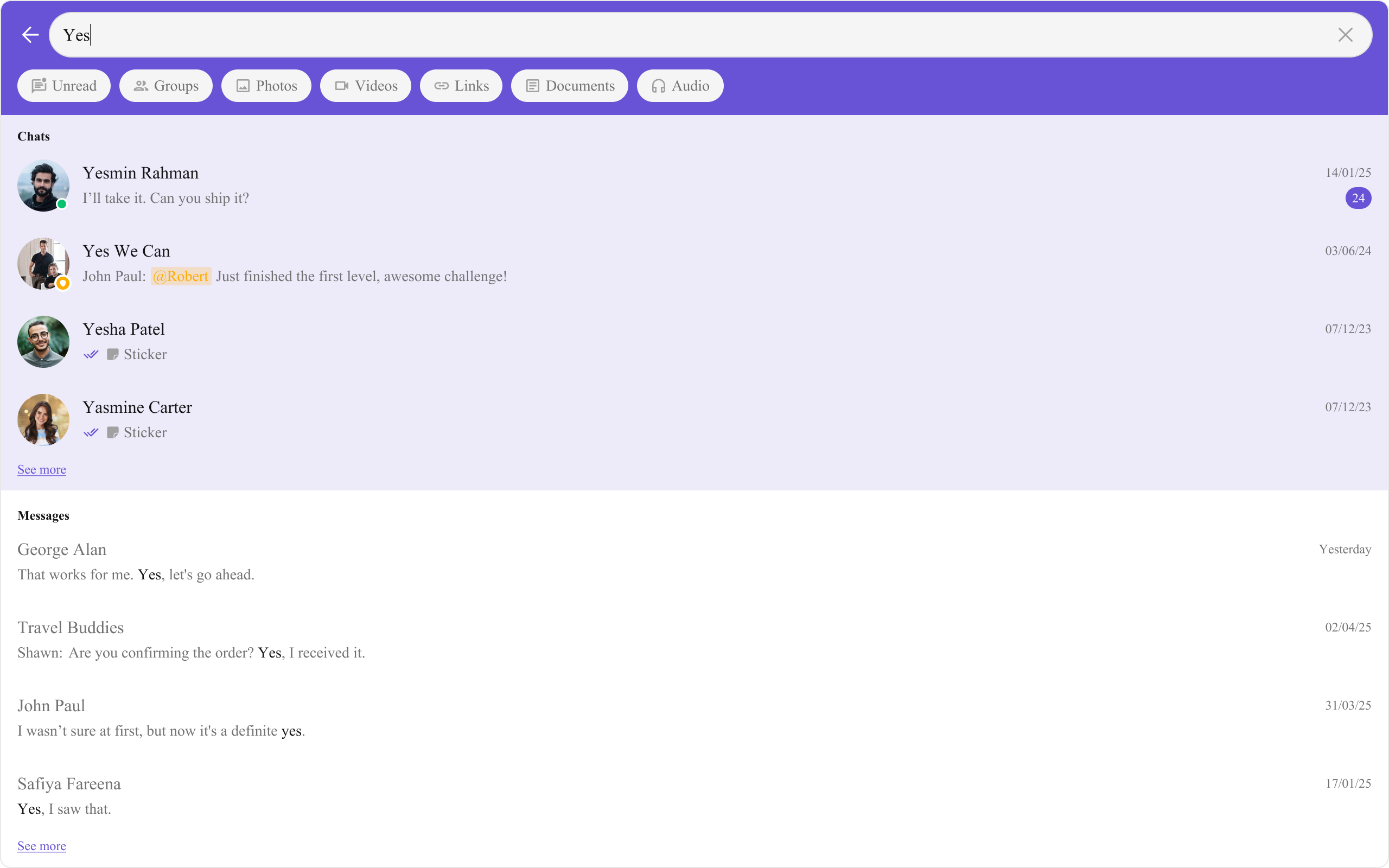
This renders a search interface with:
Search input with auto-focus
Filter chips (Messages, Conversations, Unread, Groups, Photos, Videos, etc.)
Conversation results section
Message results section
Keyword highlighting in results
Step 2: Handle Search Results Wire up callbacks to navigate when users click on search results:
import { useState } from "react" ; import { CometChatSearch } from "@cometchat/chat-uikit-react" ; import { CometChat } from "@cometchat/chat-sdk-javascript" ; import "@cometchat/chat-uikit-react/css-variables.css" ; function SearchWithNavigation () { const [ selectedConversation , setSelectedConversation ] = useState < CometChat . Conversation >(); const [ selectedMessage , setSelectedMessage ] = useState < CometChat . BaseMessage >(); const handleConversationClicked = ( conversation : CometChat . Conversation , searchKeyword ?: string ) => { console . log ( "Navigate to conversation:" , conversation . getConversationId ()); console . log ( "Search keyword:" , searchKeyword ); setSelectedConversation ( conversation ); }; const handleMessageClicked = ( message : CometChat . BaseMessage , searchKeyword ?: string ) => { console . log ( "Navigate to message:" , message . getId ()); console . log ( "Search keyword:" , searchKeyword ); setSelectedMessage ( message ); }; return ( < div style = { { width: "100%" , height: "100vh" } } > < CometChatSearch onConversationClicked = { handleConversationClicked } onMessageClicked = { handleMessageClicked } /> </ div > ); } export default SearchWithNavigation ;
The searchKeyword parameter is passed to callbacks so you can highlight the search term in the destination view.
Step 3: Control Search Scope Limit what gets searched using searchIn with CometChatSearchScope:
import { CometChatSearch , CometChatSearchScope , } from "@cometchat/chat-uikit-react" ; function MessagesOnlySearch () { return ( < CometChatSearch searchIn = { [ CometChatSearchScope . Messages ] } /> ); }
Available scopes:
CometChatSearchScope.Conversations — Search conversation names onlyCometChatSearchScope.Messages — Search message content only
Step 4: Control Filter Chips Customize which filter chips appear using searchFilters:
import { CometChatSearch , CometChatSearchFilter , } from "@cometchat/chat-uikit-react" ; function MediaSearch () { return ( < CometChatSearch searchFilters = { [ CometChatSearchFilter . Photos , CometChatSearchFilter . Videos , CometChatSearchFilter . Documents , CometChatSearchFilter . Audio , ] } initialSearchFilter = { CometChatSearchFilter . Photos } /> ); }
Available filters:
Filter Description CometChatSearchFilter.MessagesAll text messages CometChatSearchFilter.ConversationsConversation names CometChatSearchFilter.UnreadUnread conversations CometChatSearchFilter.GroupsGroup conversations CometChatSearchFilter.PhotosImage attachments CometChatSearchFilter.VideosVideo attachments CometChatSearchFilter.LinksURLs in messages CometChatSearchFilter.DocumentsFile attachments CometChatSearchFilter.AudioAudio attachments
Step 5: Scoped Search (User or Group) Limit search to a specific conversation using uid or guid:
import { CometChatSearch } from "@cometchat/chat-uikit-react" ; // Search within a specific user's conversation function UserScopedSearch ({ userId } : { userId : string }) { return < CometChatSearch uid = { userId } /> ; } // Search within a specific group's conversation function GroupScopedSearch ({ groupId } : { groupId : string }) { return < CometChatSearch guid = { groupId } /> ; }
When uid or guid is set, search results are limited to messages within that specific conversation.
Step 6: Custom Request Builders Fine-tune search queries using SDK request builders:
import { CometChat } from "@cometchat/chat-sdk-javascript" ; import { CometChatSearch } from "@cometchat/chat-uikit-react" ; function CustomBuilderSearch () { return ( < CometChatSearch conversationsRequestBuilder = { new CometChat . ConversationsRequestBuilder () . setLimit ( 5 ) } messagesRequestBuilder = { new CometChat . MessagesRequestBuilder () . setLimit ( 10 ) . setCategories ([ "message" ]) . setTypes ([ "text" ]) } /> ); }
Step 7: Integrate with Chat Layout Add search to your chat application layout:
import { useState } from "react" ; import { CometChatSearch , CometChatConversationsWithMessages , } from "@cometchat/chat-uikit-react" ; import { CometChat } from "@cometchat/chat-sdk-javascript" ; import "@cometchat/chat-uikit-react/css-variables.css" ; function ChatWithSearch () { const [ showSearch , setShowSearch ] = useState ( false ); const [ activeConversation , setActiveConversation ] = useState < CometChat . Conversation >(); const handleConversationClicked = ( conversation : CometChat . Conversation , searchKeyword ?: string ) => { setActiveConversation ( conversation ); setShowSearch ( false ); }; const handleMessageClicked = ( message : CometChat . BaseMessage , searchKeyword ?: string ) => { // Navigate to the message's conversation // You may need to fetch the conversation from the message console . log ( "Navigate to message:" , message . getId ()); setShowSearch ( false ); }; return ( < div style = { { width: "100vw" , height: "100vh" } } > { showSearch ? ( < CometChatSearch onConversationClicked = { handleConversationClicked } onMessageClicked = { handleMessageClicked } onBack = { () => setShowSearch ( false ) } /> ) : ( < div > < button onClick = { () => setShowSearch ( true ) } > 🔍 Search </ button > < CometChatConversationsWithMessages /> </ div > ) } </ div > ); } export default ChatWithSearch ;
Complete Example Here’s a full implementation with search integrated into a chat layout:
import { useState } from "react" ; import { CometChatSearch , CometChatSearchFilter , CometChatConversations , CometChatMessageHeader , CometChatMessageList , CometChatMessageComposer , } from "@cometchat/chat-uikit-react" ; import { CometChat } from "@cometchat/chat-sdk-javascript" ; import "@cometchat/chat-uikit-react/css-variables.css" ; function SearchIntegration () { const [ showSearch , setShowSearch ] = useState ( false ); const [ selectedConversation , setSelectedConversation ] = useState < CometChat . Conversation >(); const handleConversationClicked = ( conversation : CometChat . Conversation , searchKeyword ?: string ) => { setSelectedConversation ( conversation ); setShowSearch ( false ); }; const handleMessageClicked = async ( message : CometChat . BaseMessage , searchKeyword ?: string ) => { // Get the conversation for this message const receiverId = message . getReceiverId (); const receiverType = message . getReceiverType (); try { const conversation = await CometChat . getConversation ( receiverId , receiverType ); setSelectedConversation ( conversation ); setShowSearch ( false ); } catch ( error ) { console . error ( "Failed to get conversation:" , error ); } }; // Extract user or group from conversation const getConversationWith = () => { if ( ! selectedConversation ) return null ; const type = selectedConversation . getConversationType (); if ( type === "user" ) { return { user: selectedConversation . getConversationWith () as CometChat . User }; } return { group: selectedConversation . getConversationWith () as CometChat . Group }; }; const conversationWith = getConversationWith (); if ( showSearch ) { return ( < div style = { { width: "100vw" , height: "100vh" } } > < CometChatSearch onConversationClicked = { handleConversationClicked } onMessageClicked = { handleMessageClicked } onBack = { () => setShowSearch ( false ) } searchFilters = { [ CometChatSearchFilter . Messages , CometChatSearchFilter . Conversations , CometChatSearchFilter . Photos , CometChatSearchFilter . Videos , CometChatSearchFilter . Documents , ] } /> </ div > ); } return ( < div style = { { display: "flex" , height: "100vh" , width: "100vw" } } > { /* Conversations Panel */ } < div style = { { width: 400 , height: "100%" , borderRight: "1px solid #eee" } } > < div style = { { padding: "8px 16px" , borderBottom: "1px solid #eee" } } > < button onClick = { () => setShowSearch ( true ) } style = { { width: "100%" , padding: "8px 12px" , border: "1px solid #ddd" , borderRadius: 8 , background: "#f5f5f5" , cursor: "pointer" , textAlign: "left" , color: "#727272" , } } > 🔍 Search messages and conversations... </ button > </ div > < CometChatConversations onItemClick = { ( conversation ) => setSelectedConversation ( conversation ) } activeConversation = { selectedConversation } /> </ div > { /* Message Panel */ } { conversationWith ? ( < div style = { { flex: 1 , display: "flex" , flexDirection: "column" } } > < CometChatMessageHeader { ... conversationWith } /> < CometChatMessageList { ... conversationWith } /> < CometChatMessageComposer { ... conversationWith } /> </ div > ) : ( < div style = { { flex: 1 , display: "grid" , placeItems: "center" , background: "#f5f5f5" , color: "#727272" } } > Select a conversation to start messaging </ div > ) } </ div > ); } export default SearchIntegration ;
Custom Message Item View Replace how message results are displayed: import { CometChatSearch } from "@cometchat/chat-uikit-react" ; import { CometChat } from "@cometchat/chat-sdk-javascript" ; function CustomMessageItemSearch () { const getMessageItemView = ( message : CometChat . BaseMessage ) => ( < div style = { { padding: "8px 16px" , borderBottom: "1px solid #eee" } } > < div style = { { fontWeight: 500 } } > { message . getSender ()?. getName () } </ div > < div style = { { color: "#727272" , fontSize: 14 } } > { message instanceof CometChat . TextMessage ? ( message as CometChat . TextMessage ). getText () : message . getType () } </ div > </ div > ); return < CometChatSearch messageItemView = { getMessageItemView } /> ; }
Custom Conversation Item View Replace how conversation results are displayed: import { CometChatSearch } from "@cometchat/chat-uikit-react" ; import { CometChat } from "@cometchat/chat-sdk-javascript" ; function CustomConversationItemSearch () { const getConversationItemView = ( conversation : CometChat . Conversation ) => { const conversationWith = conversation . getConversationWith (); const name = conversationWith instanceof CometChat . User ? conversationWith . getName () : ( conversationWith as CometChat . Group ). getName (); return ( < div style = { { padding: "8px 16px" , borderBottom: "1px solid #eee" } } > < div style = { { fontWeight: 500 } } > { name } </ div > < div style = { { color: "#727272" , fontSize: 12 } } > { conversation . getConversationType () } </ div > </ div > ); }; return < CometChatSearch conversationItemView = { getConversationItemView } /> ; }
Custom Empty State Show a custom message when no results are found: import { CometChatSearch } from "@cometchat/chat-uikit-react" ; function CustomEmptySearch () { return ( < CometChatSearch emptyView = { < div style = { { textAlign: "center" , padding: 40 } } > < p style = { { fontSize: 48 } } > 🔍 </ p > < p style = { { fontWeight: 500 } } > No results found </ p > < p style = { { color: "#727272" } } > Try a different search term </ p > </ div > } /> ); }
Visibility Options Control which UI elements are visible: import { CometChatSearch } from "@cometchat/chat-uikit-react" ; function MinimalSearch () { return ( < CometChatSearch hideBackButton = { true } // Hide back button hideUserStatus = { true } // Hide online/offline indicators hideGroupType = { true } // Hide group type icons hideReceipts = { true } // Hide read/delivery receipts /> ); }
Key CSS Selectors Target Selector Search root .cometchat-searchHeader .cometchat-search__headerSearch input .cometchat-search__inputBack button .cometchat-search__back-buttonFilter bar .cometchat-search__body-filtersFilter chip .cometchat-search__body-filterActive filter .cometchat-search__body-filter-activeConversations section .cometchat-search__conversationsMessages section .cometchat-search__messagesMessage list item .cometchat-search-messages__list-itemText highlight .cometchat-search .cometchat-text-highlightEmpty view .cometchat-search__empty-view
Example: Brand-Themed Search .cometchat-search__header { background-color : #6852d6 ; } .cometchat-search__back-button .cometchat-button .cometchat-button__icon { background : white ; } .cometchat-search__body-filter-active { background-color : #6852d6 ; color : white ; } .cometchat-search .cometchat-text-highlight { background-color : #edeafa ; color : #6852d6 ; font-weight : 600 ; }
Common Issues Components must not render until CometChat is initialized and the user is logged in. Gate rendering with state checks.
Issue Solution No search results Ensure messages exist in the app; check search keyword spelling Filters not showing Verify searchFilters array contains valid CometChatSearchFilter values Scoped search not working Ensure uid or guid matches an existing user/group Callbacks not firing Verify onConversationClicked and onMessageClicked are passed correctly Styles missing Add @import url("@cometchat/chat-uikit-react/css-variables.css"); to global CSS
For more help, see the Troubleshooting Guide or contact CometChat Support .
Next Steps