{
  "component": "MessageTranslationExtension",
  "package": "@cometchat/chat-uikit-react",
  "import": "import { MessageTranslationExtension } from \"@cometchat/chat-uikit-react\";",
  "cssImport": "import \"@cometchat/chat-uikit-react/css-variables.css\";",
  "description": "Enables automatic message translation to the user's locale, allowing seamless communication across different languages.",
  "dashboardSetup": "Enable Message Translation in CometChat Dashboard > Extensions > User Engagement",
  "autoIntegration": {
    "messageList": "Translate option appears in message action sheet"
  }
}

Overview

This guide shows you how to enable message translation in your chat. Translation lets users translate messages to their preferred language with a single click. Time estimate: 5 minutes
Difficulty: Beginner

Prerequisites

Steps

Step 1: Enable Translation Extension

  1. Go to your CometChat Dashboard
  2. Navigate to ExtensionsUser Engagement
  3. Enable Message Translation

Step 2: Auto-Integration

Once enabled, translation automatically integrates into your chat:
import {
  CometChatMessageList,
  CometChatMessageComposer,
} from "@cometchat/chat-uikit-react";
import { CometChat } from "@cometchat/chat-sdk-javascript";
import "@cometchat/chat-uikit-react/css-variables.css";

function ChatWithTranslation({ user }: { user: CometChat.User }) {
  return (
    <div style={{ display: "flex", flexDirection: "column", height: "100vh" }}>
      <CometChatMessageList user={user} />
      <CometChatMessageComposer user={user} />
    </div>
  );
}

export default ChatWithTranslation;
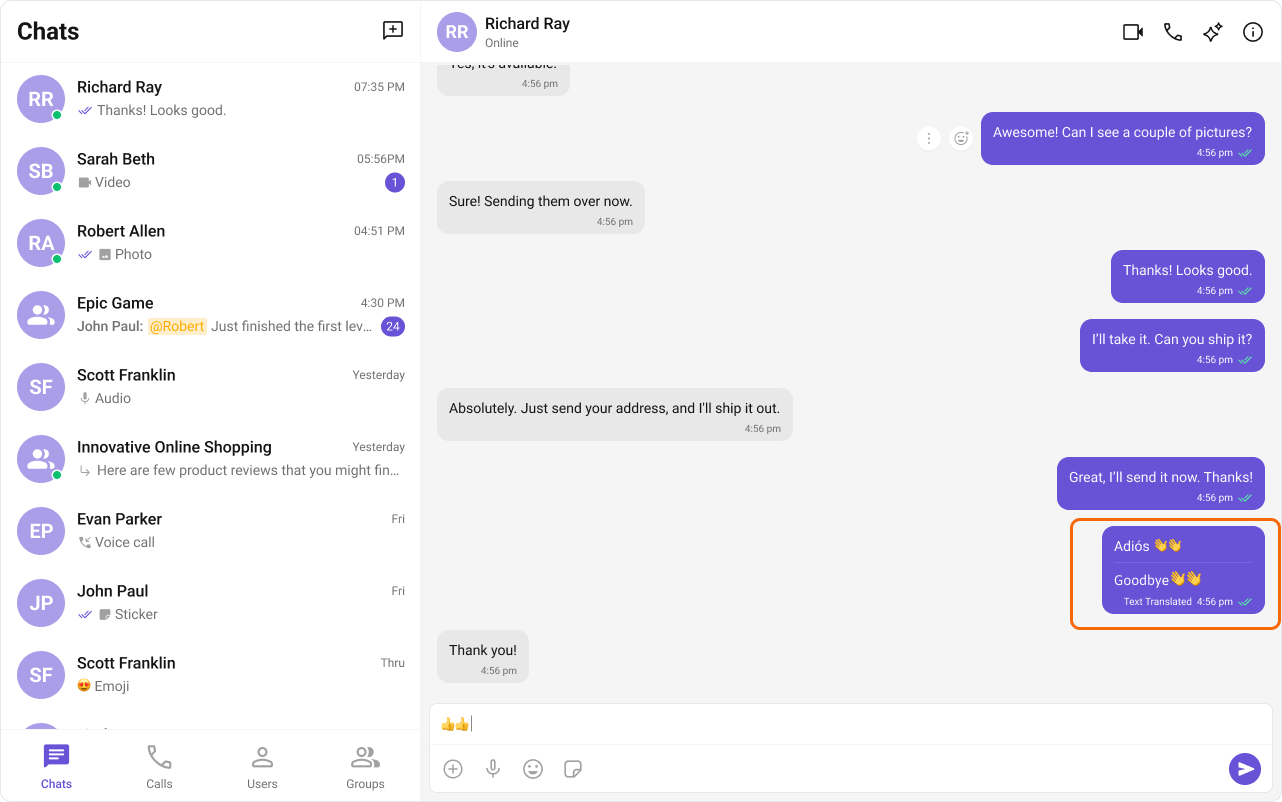
The translate option appears in the message action sheet (long-press or right-click on a message).
Message translation interface

Step 3: Translate Messages

Users can translate messages through the UI:
  1. Long-press or right-click on a message
  2. Select “Translate” from the action menu
  3. The translated text appears below the original message

Complete Example

Full chat with translation:
import { useState, useEffect } from "react";
import {
  CometChatMessageList,
  CometChatMessageComposer,
  CometChatMessageHeader,
} from "@cometchat/chat-uikit-react";
import { CometChat } from "@cometchat/chat-sdk-javascript";
import "@cometchat/chat-uikit-react/css-variables.css";

function TranslationChat() {
  const [user, setUser] = useState<CometChat.User | null>(null);

  useEffect(() => {
    CometChat.getUser("USER_ID").then(setUser);
  }, []);

  if (!user) return <div>Loading...</div>;

  return (
    <div style={{ display: "flex", flexDirection: "column", height: "100vh" }}>
      <CometChatMessageHeader user={user} />
      
      <div style={{ flex: 1, overflow: "hidden" }}>
        <CometChatMessageList user={user} />
      </div>
      
      <CometChatMessageComposer user={user} />
    </div>
  );
}

export default TranslationChat;

Translate Messages Programmatically

import { CometChat } from "@cometchat/chat-sdk-javascript";

async function translateMessage(
  messageId: number,
  targetLanguage: string = "en"
): Promise<string> {
  try {
    const response = await CometChat.callExtension(
      "message-translation",
      "POST",
      "v2/translate",
      {
        msgId: messageId,
        languages: [targetLanguage],
      }
    );
    return response.data?.translations?.[targetLanguage] || "";
  } catch (error) {
    console.error("Error translating message:", error);
    throw error;
  }
}

// Usage
translateMessage(12345, "es").then((translation) => {
  console.log("Spanish translation:", translation);
});

Auto-Translate All Messages

Set up automatic translation for incoming messages:
import { useEffect, useState } from "react";
import { CometChat } from "@cometchat/chat-sdk-javascript";

function useAutoTranslation(targetLanguage: string = "en") {
  const [translations, setTranslations] = useState<Record<number, string>>({});

  useEffect(() => {
    const listenerId = "auto-translate-listener";

    CometChat.addMessageListener(
      listenerId,
      new CometChat.MessageListener({
        onTextMessageReceived: async (message: CometChat.TextMessage) => {
          try {
            const response = await CometChat.callExtension(
              "message-translation",
              "POST",
              "v2/translate",
              {
                msgId: message.getId(),
                languages: [targetLanguage],
              }
            );
            
            const translation = response.data?.translations?.[targetLanguage];
            if (translation) {
              setTranslations((prev) => ({
                ...prev,
                [message.getId()]: translation,
              }));
            }
          } catch (error) {
            console.error("Translation error:", error);
          }
        },
      })
    );

    return () => CometChat.removeMessageListener(listenerId);
  }, [targetLanguage]);

  return translations;
}

Custom Translation UI

Build a custom translation component:
import { useState } from "react";
import { CometChat } from "@cometchat/chat-sdk-javascript";

interface TranslationButtonProps {
  message: CometChat.TextMessage;
  targetLanguage?: string;
}

function TranslationButton({ message, targetLanguage = "en" }: TranslationButtonProps) {
  const [translation, setTranslation] = useState<string | null>(null);
  const [loading, setLoading] = useState(false);

  const handleTranslate = async () => {
    setLoading(true);
    try {
      const response = await CometChat.callExtension(
        "message-translation",
        "POST",
        "v2/translate",
        {
          msgId: message.getId(),
          languages: [targetLanguage],
        }
      );
      setTranslation(response.data?.translations?.[targetLanguage] || "");
    } catch (error) {
      console.error("Error:", error);
    } finally {
      setLoading(false);
    }
  };

  return (
    <div className="translation-container">
      {!translation ? (
        <button 
          onClick={handleTranslate} 
          disabled={loading}
          className="translate-button"
        >
          {loading ? "Translating..." : "🌐 Translate"}
        </button>
      ) : (
        <div className="translation-result">
          <span className="translation-label">Translation:</span>
          <p>{translation}</p>
        </div>
      )}
    </div>
  );
}

Supported Languages

Common language codes:
  • en - English
  • es - Spanish
  • fr - French
  • de - German
  • it - Italian
  • pt - Portuguese
  • zh - Chinese
  • ja - Japanese
  • ko - Korean
  • ar - Arabic
  • hi - Hindi
  • ru - Russian

Styling

Customize translation appearance:
.cometchat-message-translation {
  margin-top: 8px;
  padding: 8px 12px;
  background: #f5f5f5;
  border-radius: 8px;
  border-left: 3px solid #6852d6;
}

.cometchat-message-translation__label {
  font-size: 11px;
  color: #666;
  text-transform: uppercase;
  margin-bottom: 4px;
}

.cometchat-message-translation__text {
  font-size: 14px;
  color: #333;
  line-height: 1.4;
}

.translate-button {
  padding: 4px 8px;
  font-size: 12px;
  border-radius: 4px;
  background: transparent;
  border: 1px solid #e0e0e0;
  cursor: pointer;
  color: #666;
}

.translate-button:hover {
  background: #f5f5f5;
  color: #6852d6;
  border-color: #6852d6;
}

Common Issues

Message Translation uses third-party translation services. Translation quality may vary depending on the language pair and content complexity.
IssueSolution
Translate option not showingEnable extension in Dashboard
Translation failedCheck API limits and network connectivity
Poor translation qualitySome languages have better support than others
Slow translationTranslation API calls take 1-2 seconds

Next Steps