

AI Agent Component Spec
AI Agent Component Spec
Overview
This guide shows you how to add interactive polls to your chat using CometChat’s Polls extension. Polls let users create questions with multiple options and collect votes from group members. Time estimate: 5 minutesDifficulty: Beginner
Prerequisites
- React.js setup complete
- Groups configured
- CometChat account with Polls extension access
Steps
Step 1: Enable Polls Extension
- Go to your CometChat Dashboard
- Navigate to Extensions → User Engagement
- Enable Polls
Step 2: Polls Auto-Integration
Once enabled, polls automatically integrate into your chat: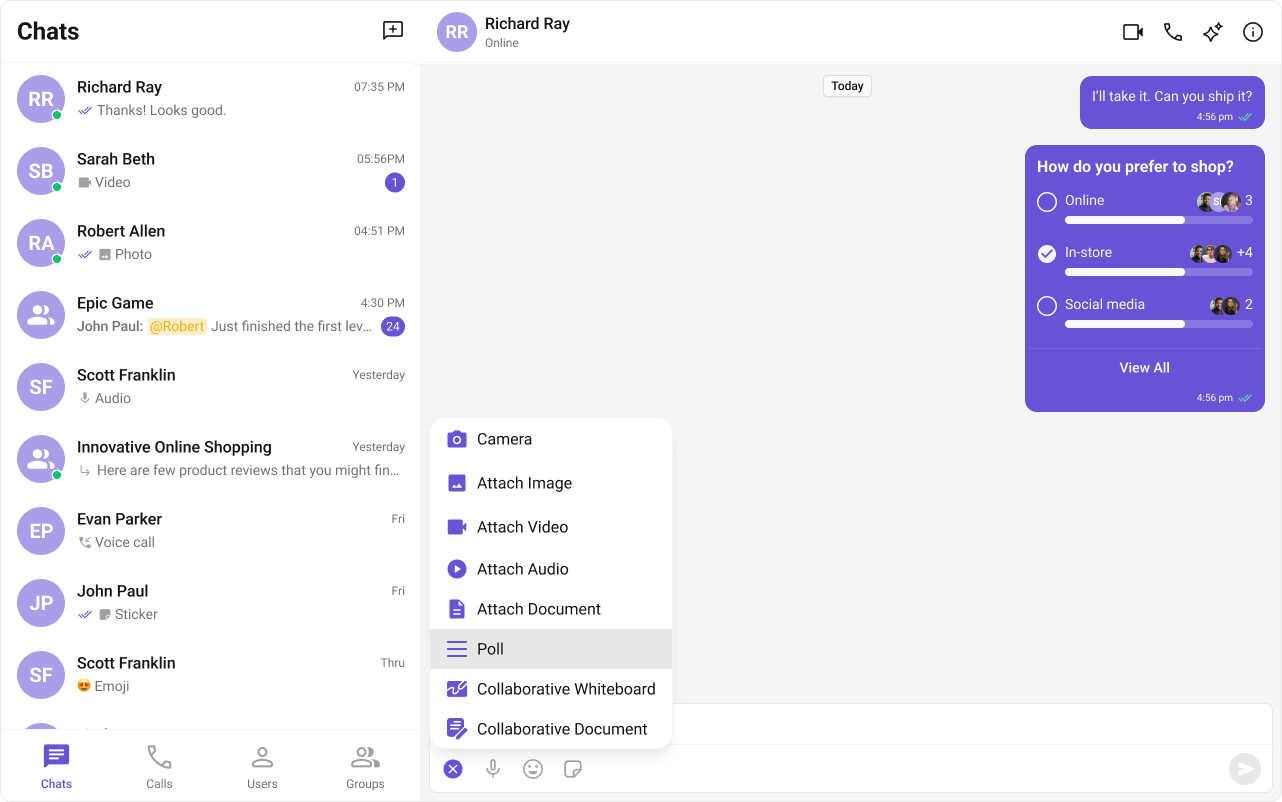
Step 3: Create a Poll
Users can create polls through the UI:- Click the attachment/action button in the message composer
- Select “Create Poll”
- Enter the poll question
- Add answer options (minimum 2)
- Send the poll
Step 4: Vote on Polls
Poll messages render with interactive voting:- Click an option to vote
- See real-time vote counts
- View who voted for each option
Complete Example
Full group chat with polls:Advanced Configuration
Advanced Configuration
Styling
Customize poll appearance:Common Issues
| Issue | Solution |
|---|---|
| Poll button not showing | Ensure Polls extension is enabled in Dashboard |
| Can’t vote | Check if you’ve already voted (one vote per user) |
| Poll not updating | Verify real-time listeners are active |
| Only works in groups | Polls are designed for group decision-making |