{
  "component": "CollaborativeDocumentExtension",
  "package": "@cometchat/chat-uikit-react",
  "import": "import { CollaborativeDocumentExtension } from \"@cometchat/chat-uikit-react\";",
  "cssImport": "import \"@cometchat/chat-uikit-react/css-variables.css\";",
  "description": "Enables real-time collaborative document editing for team collaboration within chat conversations.",
  "dashboardSetup": "Enable Collaborative Document in CometChat Dashboard > Extensions > Collaboration",
  "autoIntegration": {
    "messageComposer": "Document button appears in action sheet",
    "messageList": "Document messages render with preview and edit link"
  }
}

Overview

This guide shows you how to add collaborative document editing to your chat. Documents let users create and edit shared documents together in real-time, similar to Google Docs. Time estimate: 5 minutes
Difficulty: Beginner

Prerequisites

Steps

Step 1: Enable Document Extension

  1. Go to your CometChat Dashboard
  2. Navigate to ExtensionsCollaboration
  3. Enable Collaborative Document

Step 2: Auto-Integration

Once enabled, documents automatically integrate into your chat:
import {
  CometChatMessageList,
  CometChatMessageComposer,
} from "@cometchat/chat-uikit-react";
import { CometChat } from "@cometchat/chat-sdk-javascript";
import "@cometchat/chat-uikit-react/css-variables.css";

function ChatWithDocuments({ group }: { group: CometChat.Group }) {
  return (
    <div style={{ display: "flex", flexDirection: "column", height: "100vh" }}>
      <CometChatMessageList group={group} />
      <CometChatMessageComposer group={group} />
    </div>
  );
}

export default ChatWithDocuments;
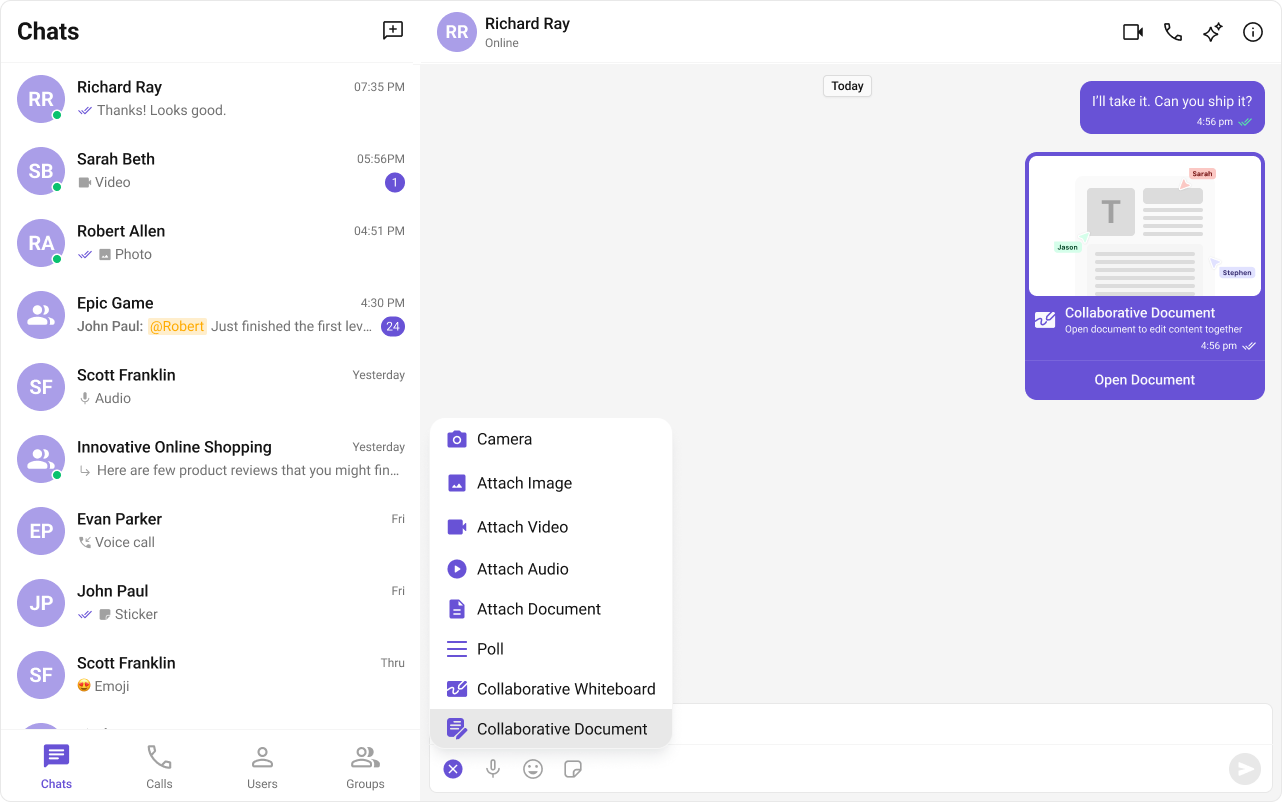
The document button appears in the message composer’s action sheet.
Collaborative document interface

Step 3: Create a Document

Users can create documents through the UI:
  1. Click the attachment/action button in the message composer
  2. Select “Collaborative Document”
  3. A document session is created and shared in the chat

Step 4: Edit Documents Together

When a document message appears:
  1. Click the document message to open the editor
  2. All participants can edit simultaneously
  3. Changes sync in real-time

Complete Example

Full group chat with documents:
import { useState, useEffect } from "react";
import {
  CometChatMessageList,
  CometChatMessageComposer,
  CometChatMessageHeader,
} from "@cometchat/chat-uikit-react";
import { CometChat } from "@cometchat/chat-sdk-javascript";
import "@cometchat/chat-uikit-react/css-variables.css";

function DocumentGroupChat() {
  const [group, setGroup] = useState<CometChat.Group | null>(null);

  useEffect(() => {
    CometChat.getGroup("GROUP_ID").then(setGroup);
  }, []);

  if (!group) return <div>Loading...</div>;

  return (
    <div style={{ display: "flex", flexDirection: "column", height: "100vh" }}>
      <CometChatMessageHeader group={group} />
      
      <div style={{ flex: 1, overflow: "hidden" }}>
        <CometChatMessageList group={group} />
      </div>
      
      <CometChatMessageComposer group={group} />
    </div>
  );
}

export default DocumentGroupChat;

Create Document Programmatically

import { CometChat } from "@cometchat/chat-sdk-javascript";

async function createDocument(groupId: string) {
  try {
    const response = await CometChat.callExtension(
      "document",
      "POST",
      "v1/create",
      {
        receiver: groupId,
        receiverType: CometChat.RECEIVER_TYPE.GROUP,
      }
    );
    console.log("Document created:", response);
    return response;
  } catch (error) {
    console.error("Error creating document:", error);
    throw error;
  }
}

Custom Document Configuration

import {
  CometChatMessageComposer,
  CollaborativeDocumentConfiguration,
} from "@cometchat/chat-uikit-react";
import { CometChat } from "@cometchat/chat-sdk-javascript";

function ComposerWithCustomDocument({ group }: { group: CometChat.Group }) {
  const documentConfig = new CollaborativeDocumentConfiguration({
    // Custom configuration options
  });

  return (
    <CometChatMessageComposer
      group={group}
      collaborativeDocumentConfiguration={documentConfig}
    />
  );
}

Listen for Document Events

import { useEffect } from "react";
import { CometChat } from "@cometchat/chat-sdk-javascript";

function useDocumentEvents() {
  useEffect(() => {
    const listenerId = "document-listener";

    CometChat.addMessageListener(
      listenerId,
      new CometChat.MessageListener({
        onCustomMessageReceived: (message: CometChat.CustomMessage) => {
          if (message.getType() === "extension_document") {
            console.log("Document message received:", message);
          }
        },
      })
    );

    return () => CometChat.removeMessageListener(listenerId);
  }, []);
}

Styling

Customize document message appearance:
.cometchat-document-bubble {
  background: #ffffff;
  border-radius: 12px;
  padding: 12px;
  max-width: 280px;
}

.cometchat-document-bubble__icon {
  width: 48px;
  height: 48px;
  background: #e3f2fd;
  border-radius: 8px;
  display: flex;
  align-items: center;
  justify-content: center;
}

.cometchat-document-bubble__title {
  font-weight: 600;
  margin-top: 8px;
}

.cometchat-document-bubble__subtitle {
  font-size: 12px;
  color: #666;
  margin-top: 4px;
}

.cometchat-document-bubble__edit-button {
  width: 100%;
  padding: 10px;
  margin-top: 12px;
  border-radius: 8px;
  background: #6852d6;
  color: #ffffff;
  border: none;
  cursor: pointer;
}

.cometchat-document-bubble__edit-button:hover {
  background: #5741c7;
}

Common Issues

Collaborative Documents work in both 1:1 and group conversations. Ensure the extension is enabled in your Dashboard.
IssueSolution
Document button not showingEnable extension in Dashboard
Can’t edit documentCheck if session is still active
Changes not syncingVerify network connectivity
Session expiredCreate a new document session

Next Steps