{
  "component": "CollaborativeWhiteboardExtension",
  "package": "@cometchat/chat-uikit-react",
  "import": "import { CollaborativeWhiteboardExtension } from \"@cometchat/chat-uikit-react\";",
  "cssImport": "import \"@cometchat/chat-uikit-react/css-variables.css\";",
  "description": "Enables real-time collaborative whiteboard for drawing, sketching, and visual brainstorming in chat conversations.",
  "dashboardSetup": "Enable Collaborative Whiteboard in CometChat Dashboard > Extensions > Collaboration",
  "autoIntegration": {
    "messageComposer": "Whiteboard button appears in action sheet",
    "messageList": "Whiteboard messages render with preview and join link"
  }
}

Overview

This guide shows you how to add collaborative whiteboard functionality to your chat. Whiteboards let users draw, sketch, and brainstorm together in real-time. Time estimate: 5 minutes
Difficulty: Beginner

Prerequisites

Steps

Step 1: Enable Whiteboard Extension

  1. Go to your CometChat Dashboard
  2. Navigate to ExtensionsCollaboration
  3. Enable Collaborative Whiteboard

Step 2: Auto-Integration

Once enabled, whiteboard automatically integrates into your chat:
import {
  CometChatMessageList,
  CometChatMessageComposer,
} from "@cometchat/chat-uikit-react";
import { CometChat } from "@cometchat/chat-sdk-javascript";
import "@cometchat/chat-uikit-react/css-variables.css";

function ChatWithWhiteboard({ group }: { group: CometChat.Group }) {
  return (
    <div style={{ display: "flex", flexDirection: "column", height: "100vh" }}>
      <CometChatMessageList group={group} />
      <CometChatMessageComposer group={group} />
    </div>
  );
}

export default ChatWithWhiteboard;
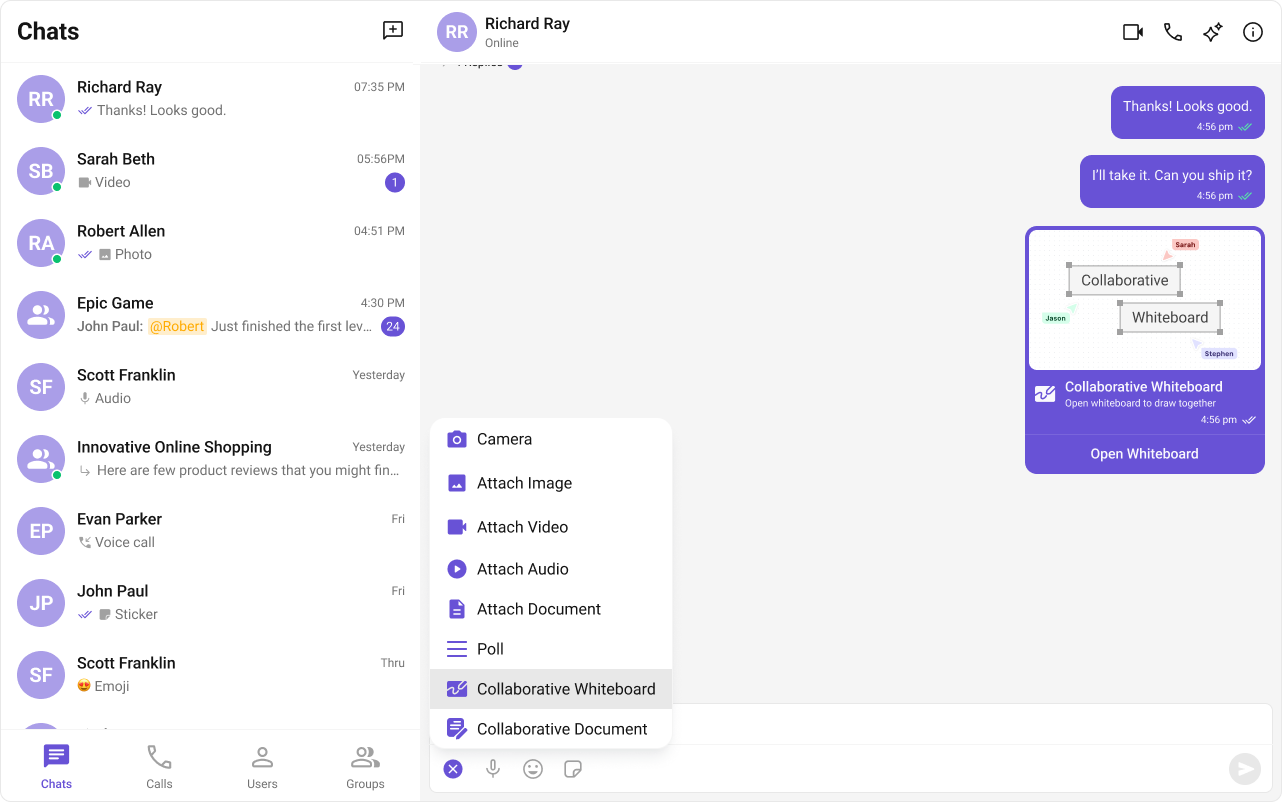
The whiteboard button appears in the message composer’s action sheet.
Collaborative whiteboard interface

Step 3: Create a Whiteboard Session

Users can create whiteboards through the UI:
  1. Click the attachment/action button in the message composer
  2. Select “Collaborative Whiteboard”
  3. A whiteboard session is created and shared in the chat

Step 4: Join Whiteboard Sessions

When a whiteboard message appears:
  1. Click the whiteboard message to open it
  2. All participants can draw simultaneously
  3. Changes sync in real-time

Complete Example

Full group chat with whiteboard:
import { useState, useEffect } from "react";
import {
  CometChatMessageList,
  CometChatMessageComposer,
  CometChatMessageHeader,
} from "@cometchat/chat-uikit-react";
import { CometChat } from "@cometchat/chat-sdk-javascript";
import "@cometchat/chat-uikit-react/css-variables.css";

function WhiteboardGroupChat() {
  const [group, setGroup] = useState<CometChat.Group | null>(null);

  useEffect(() => {
    CometChat.getGroup("GROUP_ID").then(setGroup);
  }, []);

  if (!group) return <div>Loading...</div>;

  return (
    <div style={{ display: "flex", flexDirection: "column", height: "100vh" }}>
      <CometChatMessageHeader group={group} />
      
      <div style={{ flex: 1, overflow: "hidden" }}>
        <CometChatMessageList group={group} />
      </div>
      
      <CometChatMessageComposer group={group} />
    </div>
  );
}

export default WhiteboardGroupChat;

Create Whiteboard Programmatically

import { CometChat } from "@cometchat/chat-sdk-javascript";

async function createWhiteboard(groupId: string) {
  try {
    const response = await CometChat.callExtension(
      "whiteboard",
      "POST",
      "v1/create",
      {
        receiver: groupId,
        receiverType: CometChat.RECEIVER_TYPE.GROUP,
      }
    );
    console.log("Whiteboard created:", response);
    return response;
  } catch (error) {
    console.error("Error creating whiteboard:", error);
    throw error;
  }
}

Custom Whiteboard Configuration

import {
  CometChatMessageComposer,
  CollaborativeWhiteboardConfiguration,
} from "@cometchat/chat-uikit-react";
import { CometChat } from "@cometchat/chat-sdk-javascript";

function ComposerWithCustomWhiteboard({ group }: { group: CometChat.Group }) {
  const whiteboardConfig = new CollaborativeWhiteboardConfiguration({
    // Custom configuration options
  });

  return (
    <CometChatMessageComposer
      group={group}
      collaborativeWhiteboardConfiguration={whiteboardConfig}
    />
  );
}

Listen for Whiteboard Events

import { useEffect } from "react";
import { CometChat } from "@cometchat/chat-sdk-javascript";

function useWhiteboardEvents() {
  useEffect(() => {
    const listenerId = "whiteboard-listener";

    CometChat.addMessageListener(
      listenerId,
      new CometChat.MessageListener({
        onCustomMessageReceived: (message: CometChat.CustomMessage) => {
          if (message.getType() === "extension_whiteboard") {
            console.log("Whiteboard message received:", message);
          }
        },
      })
    );

    return () => CometChat.removeMessageListener(listenerId);
  }, []);
}

Styling

Customize whiteboard message appearance:
.cometchat-whiteboard-bubble {
  background: #ffffff;
  border-radius: 12px;
  padding: 12px;
  max-width: 280px;
}

.cometchat-whiteboard-bubble__preview {
  width: 100%;
  height: 150px;
  background: #f5f5f5;
  border-radius: 8px;
  display: flex;
  align-items: center;
  justify-content: center;
}

.cometchat-whiteboard-bubble__title {
  font-weight: 600;
  margin-top: 8px;
}

.cometchat-whiteboard-bubble__join-button {
  width: 100%;
  padding: 10px;
  margin-top: 8px;
  border-radius: 8px;
  background: #6852d6;
  color: #ffffff;
  border: none;
  cursor: pointer;
}

.cometchat-whiteboard-bubble__join-button:hover {
  background: #5741c7;
}

Common Issues

Collaborative Whiteboard works best in group conversations. For 1:1 chats, consider using the Collaborative Document extension instead.
IssueSolution
Whiteboard button not showingEnable extension in Dashboard
Can’t join sessionCheck if session is still active
Drawing not syncingVerify network connectivity
Session expiredCreate a new whiteboard session

Next Steps